Google, iOS

Summer Reading Celebration #rvReads2011

Today we didn’t have a traditional day at school. We celebrated reading!

Students (and teachers) choose a book from a long list to read over the summer and then we spend one day discussing the books and celebrating! In the morning, we had pre-discussion time with our advisories (so they could actually have time to remember what they read). Then we moved into the gym and auditorium for the summer reading movie. This year’s was way better than last years’ but not much can compete with two years’ ago! After that, students separated into groups based on their books (about 2 teachers per group).
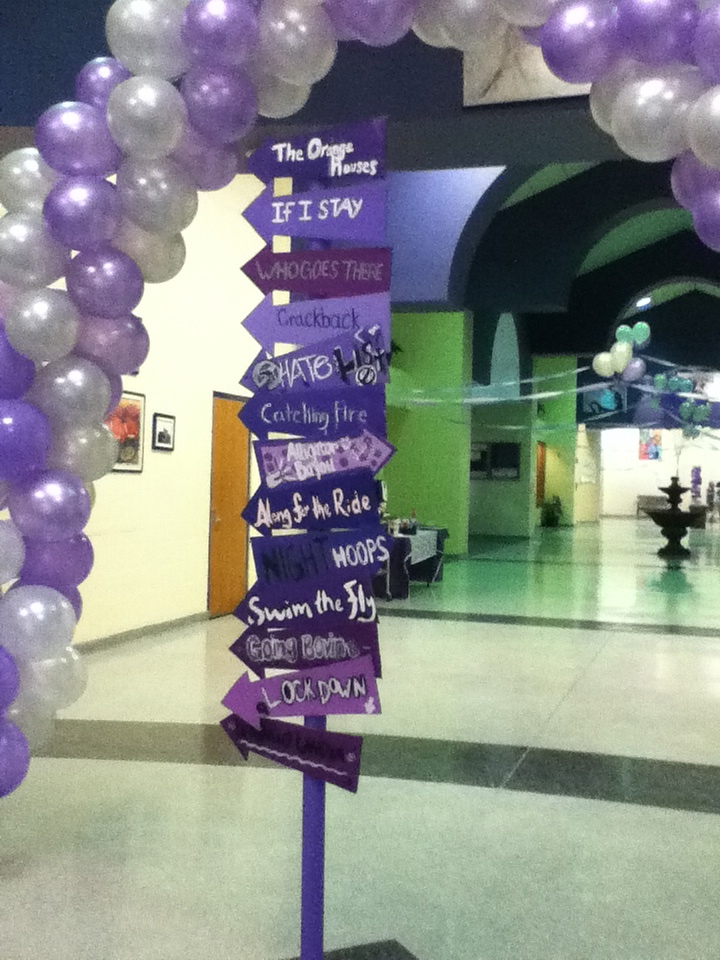
Keely Hitchings and I read The Orange Houses. We started by having them fill out a google form.

This served serveral purposes: attendance, iPod use agreement and gathering their student number so I could give them author priviledges to our blog (more on that in a minute). For our getting to know you activity, everyone (including Keely & I) wrote 3 truths on a half sheet of paper and crumpled it up in a ball. As students picked out paper balls, they read the 3 truths and tried to guess who it was (most students didn’t know each other). When we guessed correctly, the student told us their name, grade and gave a star rating to the book. Ratings ranged from 2 to 4 with mostly 3s and 4s 🙂 Yay for a good book! (seriously, you should go read it)

Our next activity was a philosophical chairs anticipation guide. Students moved to one side of the room or the other based on whether they agreed or disagreed with the statement displayed. Going back and forth between sides, students summarized the previous person’s argument and then gave us their own opinion. Last year, this activity didn’t go so well for us (we read 13 Reasons Why). This year, however, it took up way more time than we thought it would and we actually had to stop students from talking…because we wanted to move on the the awesomest part of the day!

Keely and I choose a couple good movie trailers (The Dark Knight Rises, The Curious Case of Benjamin Button) and a couple bad trailers (Twilight, Click, Transformers). We noted that it was not that these were bad MOVIES, but bad TRAILERS. We asked the students to think about what made them good or bad as we were watching them. This is what Keely and I came up with:

good because:
*makes you want to go see it NOW (even for $10)
*tells you just enough about the story to intrigue you
*tells you about the story, but leaves big gaps
*mysterious
*good music

bad because:
*gives away the entire movie (predictable plot)
*don’t need to pay to see movie after seeing trailer
*doesn’t make you wonder
*misleading
*empty
*scattered, not organized

Students then had options for what they created based on our book. Using iMovie, they could create a movie trailer. Because of time constraints, we only had one group choose this option.


The other options were a storyboard trailer (using Keynote), an epilogue, detailing which Hollywood actors would play the characters in the movie version (and why), and a countdown to a life-changing event in their own life. Because we had so little time, most of the students chose to write an epilogue or choose movie characters. Check out our blog to see what they did! The logistics of how they edited the blog…During lunch I added each of the students in our group as an author (using their google apps account). They were sent an email from me inviting them to join the blog. Using the iPods, they checked their email and followed the instructions for registering for blogger (in the future I would be diligent about having them create appropriate usernames – first initial, last name). Then students accessed and edited the blog using the Blogger app that I found in iTunes and downloaded to each iPod. This app was a great way for them to create posts with pictures. Last night, I went through and took away their author privileges so they can’t go do anything irresponsible now that we’re not watching over them. If we had more time, it would have been fun for them to comment on each others’ posts.

For the last 1.5 hours of the day, everyone headed to the gyms for a carnival. There were tons of games, face-painting, dancing, and FOOD. It’s craziness, but most of the kids have fun.

Overall, I think this year was the best celebration since I’ve been here. My only complaint was that the carnival was too long and we didn’t have enough time in our book groups. But I know other teachers would complain that they had too much time. Although we maybe get half of the student body to come to school (I don’t know exact numbers), the ones that do come seem to have a pretty good time even if they don’t want to admit it 🙂
Google, iOS

so what’s up with the iPods?

If you hadn’t noticed…I’ve mentioned having iPod touches and iPads several times. No I didn’t buy them myself. During the spring of my first year teaching (2009-2010), my district created a “21st century learning” grant. All schools (over 30) were eligible to apply and 2 of the 4 high schools were to be awarded grants of $25,000. Our Instructional Technology Specialist at the time approached the world language department and said that she had some ideas. I was still pretty new, but I was already passionate about incorporating technology into my lessons. We applied for 50 32GB iPod touches (with cameras),

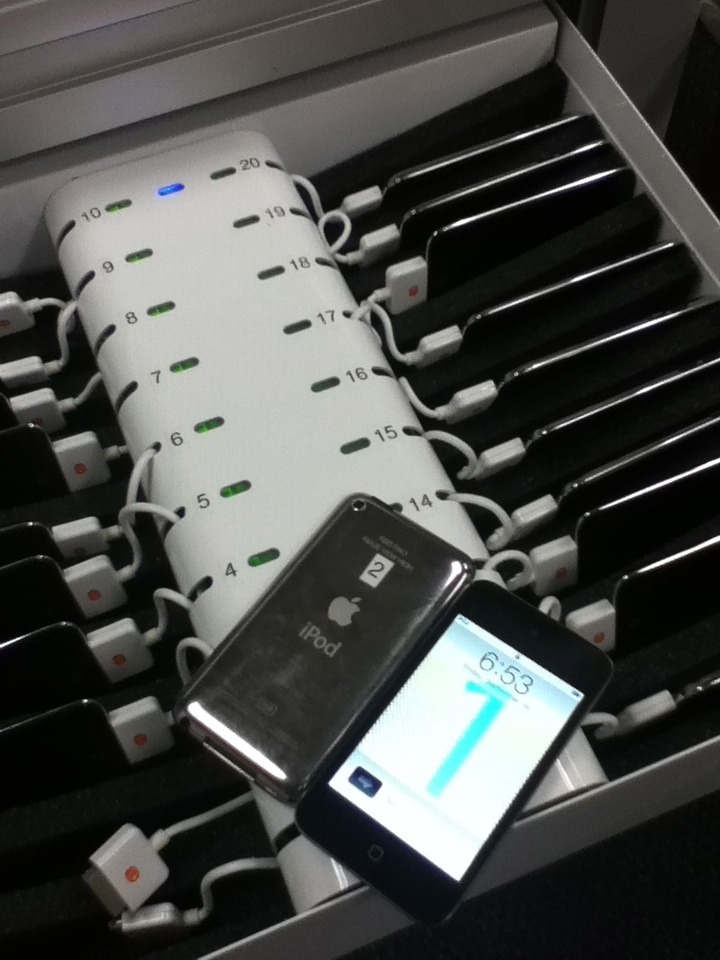
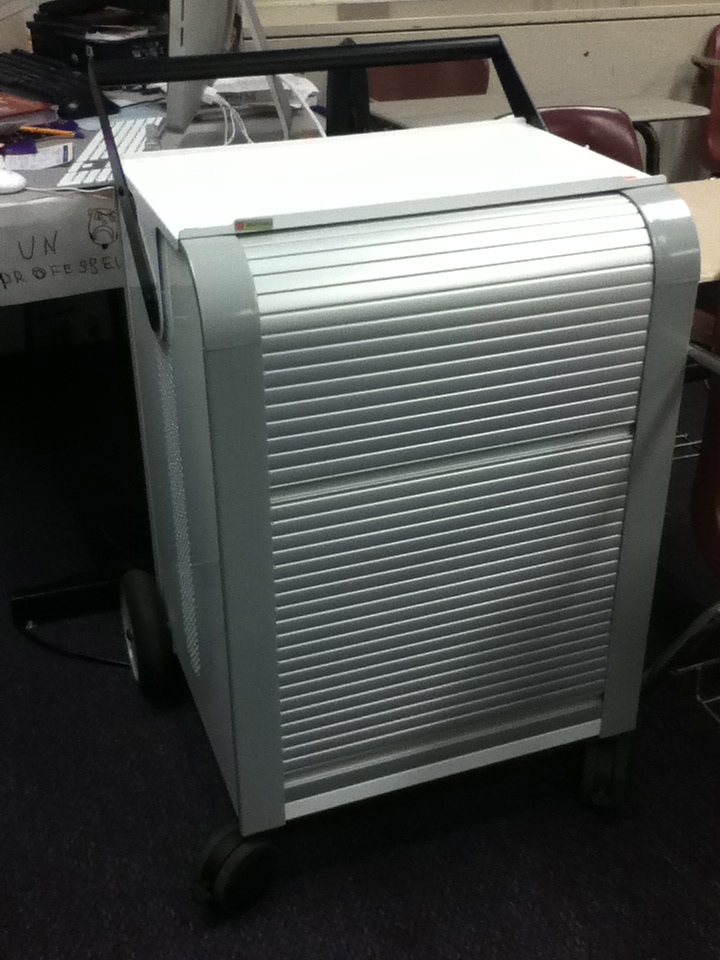
5 iPads (without cameras), 2 iPod power sync carts,

and 1 class set of SMART response XE clickers.

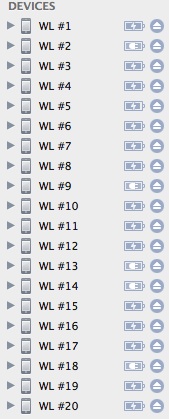
And then we waited…and waited. We found out in August that we were one of the 2 high schools to receive the grant 🙂 We were pretty excited! But then we had to wait some more to GET everything. Finally in November we were able to start working with the equipment. My new ITS did a lot of hard work to help us get organized. She named each iPod with a number. Then we labeled each of the iPods with the same number.

I worked with my French 2 students to make the backgrounds of each iPod the same number. We also labeled the slots in the carts with numbers. It’s good to be organized so that you know immediately if any iPods go missing (we haven’t had any disappear yet…knock on wood)!

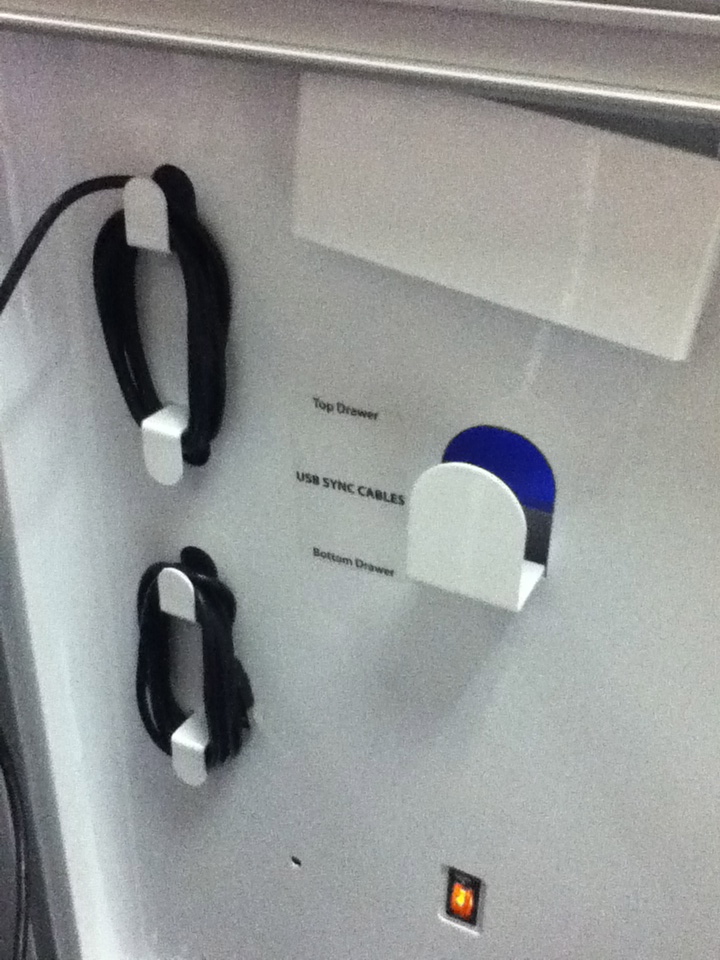
When we wrote the grant, we hadn’t thought about what we would sync the iPods and iPads to…so my awesome ITS used part of her budget to buy us an iMac. The way the carts are set up, we can plug in one USB cord to the iMac and an entire drawer (20) of iPods are connected to the computer.

Unfortunately, we have to sync/update each one individually. It’s annoying when you have 50 iPods and 5 iPads, but it’s not horrible.

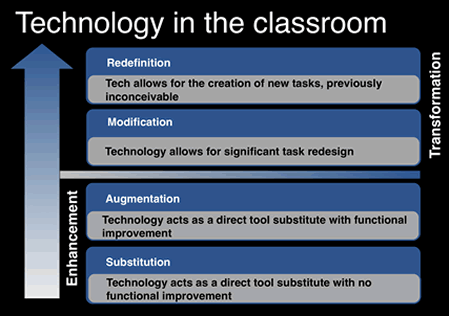
I’ve recently been enlightened by the SAMR and TPCK models of technology integration.

I now know that when we first received the iPods, I was at the substitution level. I probably sometimes still am. But after talking to my husband, we agreed that that’s not always a bad thing.

But anyway…back to last year! First thing I did was to make my students sign an iPod contract. Then I had my first semester French 1 students create flashcards and use random French apps to “study.” It didn’t go so well. Second semester fared a little better. I allowed my French 2 students to reseach apps and create proposals about which apps they would want to use and how we could use them in class. From this experiment, they used Urban Trip to create itineraries for summer trips to Paris. They also created “tutorial” videos about when to use imparfait and passé composé.

French 1 redeemed themselves with video projects about a visit to Paris.

At the end of the year, both levels created survival guide videos for this year’s classes.

I also started using the iPods to have students complete surveys, give feedback, leave “comments” on a blog post we discussed and evaluate partners.

This year I hope to be able to climb the SAMR ladder and do more activities and projects that include modification and redefinition. Unfortunately (for me), my ITS has been promoted and I won’t have as much support as last year. Hopefully someone just as innovative will be hired in her place!

Google

my (nearly) paperless beginning of the year

The past two years, all of the beginning of the year paperwork has killed my copy count. Each student has received:

  • a 2-page parent letter (including parent survey & signatures to be returned to me)
  • a 3-page syllabus
  • a 3-page grade contract
  • a 1-page participation rubric
  • a 1-page iPod contract and
  • a 1-page student survey (including signatures to be returned to me)

That added up to 11 pages of paper…times 100 students…equaled 1100 copies! I am NOT okay with that. Mostly because I know the paper is wasted. The stuff that goes home probably sits somewhere un-read or gets thrown away (not recycled). The stuff that comes back to me is filed away to (probably) never be looked at again.

So…since we have google apps for education, I decided to go to (mostly) electronic documents and forms. I sent a 2-page parent letter home with my students because I wanted to make sure parents got some sort of information telling them what to do and how. I also gave them a copy of the iPod contract because I think it is important to have them on file in case anything happens (more on why I have iPod touches in my classroom later).

In class, I showed all of the students how to access the syllabus, grade contract, participation rubric, electronic signatures for parents, and parent survey. Then I asked them to go home and teach their parents what to do. Are there still a lot of parents who haven’t completed the signature or survey? Yep. Where there quite a few who didn’t when I was all paper? Yep. If a parent emails me, I have also been able to give them the links to what they are missing.

During class, students used iPods to complete the electronic signatures for students and the student survey. My French 2 and 3 students also used the iPods to complete pre-tests to show me what they remembered from the previous level.

Have you ever used google forms? They are A-mazing. You can create a cute little survey (as seen in last week’s post) and the results show up instantaneously in an organized spreadsheet. I love being organized…electronically. This year I actually read all of the parent and student surveys. And if I want to look at any of them again, I can easily access them from anywhere. I have converted all of my important teacher paperwork to google docs and I am creating new documents exclusively with gdocs. I love being organized and having way less paper/trash around!


p.s. I used gdocs for all of my classes, not just French 1. See? You’ll also see (if you click on French 1, French 2 or French 3) that I created google calendars for each of my classes. I embedded the calendars into my website so that students can easily see if they have any upcoming assignments. Did you notice my twitter feeds? Also more coming about that later.

Google

Google docs and coaching

Just after I was hired, the athletic director approached me and asked if I would be interested in coaching track & field. I was a little wary of the time commitment but ended up saying yes. Last year, in my second year as an assistant coach, I was able to really experiment with using google docs (before my district went to apps for education). This pre-season form was our first experiment…

It worked pretty well for keeping up with athletes’ training routines. Once the season started, I knew the coaches were sick of spending hours together after practice figuring out who would be running what at all of the meets. I was also done with constantly sending different versions of everything back and forth. I convinced the other two coaches to jump on board with google docs (you don’t have to have a gmail account to use gdocs!). We shared spreadsheets to organize meet entries, keep track of top times & varsity letter points and create scouting reports & rosters. We were then able to allow anyone with the link to view these documents so that students and parents could access them on our facebook page and website (social networking with coaching & teaching to come later).

Throughout the season we used two more forms to gather information – one to get contact information from parents and another to collect RSVPs for the end of the year banquet. Throughout the year, google docs saved us countless hours and headaches. We were able to edit the schedule without having to re-send it to parents each time we changed it. We were able to quickly and easily get information to our athletes. In addition, google docs are compatible with most smartphones and other devices so people could access the information wherever & whenever they needed.

Using google docs to make more efficient use of our time as coaches was when I first really started to get obsessed. This year I have been able to use google docs almost primarily in my classroom…more to come later.

Google

My love affair with Google

I’ve had a  account since 2007 when I graduated from college. I only used it for the e-mail function at first, but found it far superior to my yahoo and hotmail accounts. In 2009, I started using google docs to create and share documents (mostly with my husband). I experimented slowly with uploading and sharing pictures, forms, and blogger. I didn’t create a lot of documents, but I uploaded many instead of using my flash drive. This was really helpful as a teacher because I have several flash drives and wouldn’t always know where they were (nothing like having to create something on the fly because you misplaced a document!).

Towards the end of the 2009-10 school year, I found out that my high school had google apps for education. I was very excited for the possibilities and worked with our Instructional Technology Specialist to get my students going. In both the ’09-10 and ’10-11 school years I found it difficult to get my students on board and to manage all of their accounts. If they forgot their password (which they did often) I had to contact my ITS and have her reset it (not what she should be doing with her time!). Students were so comfortable with Microsoft Office that it was pulling teeth to get them to use google docs. I really don’t think they understood the power of sharing and the ability to edit a document at the same time as someone else. It was also challenging for me to have three email accounts to keep track of (personal, work and google apps for ed). I was prepared to do it all again this year because I’m obsessed with 

…but over the summer we got great news! Our entire district of 25,000 students and 26+ schools went to google apps for education 🙂 My work email is now gmail based and I have access to all the google products I could need. The best thing is that each and every one of my students also received a google account (studentID@richland2.org and birthday as password). AHHH the possibilities! I have now gone to a 99% google docs system – I’m creating all of my new spreadsheets, documents and forms with google but I’m not uploading my assessments from previous years (gdocs and word don’t always play nice).

I hate having lots of unnecessary paperwork around and I enjoy playing with technology… has done wonders for my life!

p.s. I still use google in my everyday life. Even though I recently bought a highly discounted Microsoft Office 2010, I haven’t used it once. The convenience of accessing my files wherever is too addicting. I also have a Droid phone….and I probably will upgrade to another one in the spring. I know some people are weary that google will take over the world, but I think I’d quite like a  .