Collaboration, Kuwait, Professional Development

I’m a Critical Friend!

Since September I have participated in a Critical Friends Group at my school (with our coach Christina). It’s been a great experience to get to know, grow and collaborate with a small group of teachers. I would consider professional learning a weakness at our school so it’s been an enriching experience to be around people who share my professional values. We’ve met about once a month and used a variety of protocols to examine and enhance our practice. I’ve also participated in several protocols during school divisional meetings.

Today I facilitated my first protocol! Our MS principal (Dave) wanted a productive way for his staff to reflect on their weekly team meetings. I pre-conferenced with Christina and we decided on a Back to the Future Protocol. Dave is currently away on a site-visit so he wasn’t able to present. I subbed steps 1-3 with a list of questions Dave had thought of. Usually this protocol is done with 3 pieces of large butcher paper and the faciliator writes down what the group is saying. My handwriting isn’t awesome and I can type way faster than I can write. Also, I wanted something that would be easily shareable and would stick around (not be in the way or thrown away). I created a Google Spreadsheet and hoped for the best!

I gave the shortened link (view only) to all the participants in the protocol so they could follow along and see whichever of the sheets they wanted (on iPads they had to refresh to see the updates). On the classroom computer & projector, I kept the Projected Future sheet so they could always be reminded of what they were aiming for. I brought my Chromebook to the meetings so I could move around and edit whichever sheet I needed to be on.

The protocol went really well :). My experience presenting at conferences has made me comfortable in front of my peers. Plus protocols aren’t about me or my ideas…they’re about what the presenter wants accomplished. I was just the facilitator. During the debrief I specifically asked what they thought about using the Spreadsheet instead of butcher paper…they much preferred it! They liked that it was professional and didn’t make them feel like elementary teachers ;). I’ll be running another one for a different team on Sunday so I’m hoping it goes just as smoothly! [It did!]

I’ve created a template of the Back to the Future document so that anyone can view it and copy it…would love to hear how it works for you and if there are any improvements that I can make!

COETAIL, Course 4, Professional Development, Uncategorized

Flippin’ Classes and Studying with Games

Image courtesy of Eric Dufresne from Trois-Rivières, Canada – Flickr

I’m not sure what to make of the flipped classroom model and teaching classes designed as video games.

Flipping

It seems as though the purists’ model of a flipped classroom puts the classwork at home and the “homework” in the classroom. The students get their lectures online and then come to practice under the guidance of their teacher while they are at school.  I like the idea that students are getting more time in class to practice skills with the help of their teachers.  I don’t like the idea of students sitting in front of their laptops watching Khan Academy lectures at home.  But the model on Mind/Shift only has students watching 3 teacher-created videos per week, and the prescribed length is 5 to 7 minutes long.  What is the great advantage to freeing up 15 minutes of class time a week?

I’ve also heard and read about the changing role of the teacher in the classroom.  We are no longer dispensing education, we are guides and coaches. I personally think that it is a good idea to lecture in class.  I don’t think that you should lecture all the time, but I also don’t think you should rely on internet videos to do all your lecturing for you.  I think that students can be motivated when they see their teacher speaking about topics they know a lot about.  Students are impressed by my co-teacher because he worked on a nuclear submarine. There’s no doubt in their minds that this guy knows a lot about science.  It is his passion and it comes through in his teaching.

In short, I think that we should have a mixture of mini in-class lectures and practice/workshop time. Call me old-fashioned, but I just don’t think that completely eliminating direct instruction from the classroom is the best idea.

The Gaming Classroom

Complete Honesty: I won’t be turning my classroom into a video game.  The whole concept really turns me off.  I like video games but I don’t play a lot of video games.  I have felt the pull and have been “addicted” to video games in the past.  This is one of the reasons I actively avoid them.  If I allowed myself to start playing video games they would end up eating a lot of my time. This year, I’ve seen some kids who are seriously addicted to gaming.  They can be seen playing games between classes and in the cafeteria during lunch. They talk about games with their friends incessantly and they watch Youtube videos of other people playing video games. Again, call me old-fashioned but I don’t think that inserting MORE gaming into their lives is the best idea.

Also, isn’t the gaming classroom relying a little too much on extrinsic motivation.  Will the students only be interested in creeping up the leaderboard?  Will the teachers be trivializing their content?  It seems like the gaming classroom is a LOT of work for the teacher, but also really LAZY.  Laying the gaming framework in the classroom seems like it requires a lot of setup and establishment of rules, adding to the already packed teacher workload.  However, I say that it is lazy because teachers are resorting to turning their classes into video games (A surefire HIT with the kids!) instead of inspiring a real love of learning in the purest sense (Ideal… but really hard to pull off.)

One last poo-poo in the face of the gaming classroom; are the hardcore gamers sold on the idea of the gaming classroom or are they just counting the minutes until they can play a REAL video game?

Closing

This premature curmudgeon must end on a positive note.  Although I am against the idea of modeling a class after  a video game, I think iPad apps and online educational games DO have a place for reinforcing/teaching skills.

Although I have some doubts about the flipped classroom, I am definitely FOR supervised practice/exploration/workshops in the classroom.  I just don’t think a little lecture here and there really hurts.

Everything in moderation, right?

COETAIL, Course 4, Professional Development, Uncategorized

PBL or CBL or… PBL?

Brett (AKA:Mr.T) supervises a challenge.

In reading through the materials on project, challenge, and problem based learning, I’m not sure I see a real distinction between the three.  I’m not sure that I am supposed to see one at all.  I do see the appeal of setting goals for students that are based on real-life situations.

This year was the first time I spent all of my time in math and science classrooms.  Prior to this I taught third grade, ESL, and world language classes.  Teaching grade three probably gave me the best chance to engage my kids in some PBL/CBL-style situations, but I was too wrapped up in teaching reading and writing that I may have missed my shot.  I feel pretty confident saying that the grade 8 students at our school will tell you that they’ve been engaged in a lot of problem solving and project-based learning this school year.

They’ve generated electricity using steam engines constructed from soda cans.  They’ve modeled true situations using their knowledge of exponential growth.  They’ve build windmills from paper and currently they are analyzing the methods used in the ongoing search for the missing Malaysian airliner for the science unit on waves.

A lot of these ideas were generated by my co-teachers, who have put a lot of effort into giving our lessons context.  I really respect them for this.  I can’t take credit for cooking up these schemes, but I have put my efforts into making these lessons as accessible as possible for our English language learners-and it hasn’t been pretty.  In fact, the whole process has been rather ugly.  The three of us have been learning how to present challenge/problem/project based lessons as we go.  There have been some pretty tense times throughout the course of the school year, but I’m glad that we have continued to attempt to provide genuinely engaging lessons and eschewing paint-by-numbers teaching as much as possible.

I know that I have been referencing my co-teachers a lot on the blog, but co-teaching is my reality.  So, once again… thank you Brett and thank you Ryan.  You have taught me as much as you’ve taught the students this year.

Google, Kuwait, Professional Development

Kuwait International Educators Conference 2014

A couple weekends ago, Jeff and I presented at the third bi-annual Kuwait International Educators Conference at Al Bayan Bilingual School (BBS). We were invited to present in the fall after we met Lynda Abdul Raheem (FAWSEC Professional Development Coordinator) at PEAK in 2012.

KIEC was the first time we were sought out to present and the first time we’d ever done 4-hour workshops. We met with Lynda in the fall and learned all about their organization and the conference. Their philosophy is that any professional development that betters their staff will also better education as a whole in Kuwait. Love it. All BBS employees were required to attend both Saturday and Sunday (with Friday optional). They opened the conference to all educators in Kuwait and even allowed people to split tickets (3 people, 3 days, a different person attends each day). Each day there was a keynote, 4-hour workshop and 1-hour session (except Friday). At 60KD (~$212) it was a pretty great deal for a conference!

Jeff and I each led one 4-hour workshop each day. We each had two different workshops. I was scheduled to do Empowering on Friday and Sunday and GAFE – Next Level on Saturday. After Jeff lead GAFE for Beginners on Friday and Saturday, we realized the demand was high and people were excited. We switched it up and I replaced the Sunday Empowering with GAFE – Next Level. Saturday and Sunday (when all BBS teachers attended) were full sessions…and we even had to turn people away! The energy in our rooms was impressive! I had SO much fun nerding out with people over Google Apps 🙂

Empowering Teachers & Students with Technology

  • My Empowering workshop was good…but I had very high expectations after attending Scott McLeod‘s workshop at NESA. I ended with only 5 people…which made it difficult to really engage in discussion and get them creating. One piece of feedback was that the first part of the session was theoretical…but I’m not quite sure how to have attendees analyze lesson plans without the background in the frameworks (SAMR, etc). Also, almost the entire group was not educated in North America. I wonder if this makes any difference in the way teachers teach. Would definitely be interested to know how teacher education programs differ! Although it didn’t live up to my expectations, the feedback made it seem like people still got something out of it.

GAFE – Next Level

  • I left this session both days feeling energized and excited! I had a pretty big range of knowledge in the room which was difficult to keep up with at times. I started with a Google Race (adapted from my classroom in SC). The race ended up taking a little longer than expected. If I did this session again, I would like it to take less time…but I’m not sure what I would take out! I had a range of feedback from “I got a little lost at times and would have preferred a slower pace” to “I felt like it could have moved a little faster.” Seriously…it couldn’t have been more opposite! But every single piece of feedback was positive. It was incredibly rewarding and reminded me why I love what I do. I need to remember that feeling when I’m not feeling quite so positive about my job, school, etc.

Presenting at KIEC was an incredible learning experience. It was a lot of work but we also had a lot of fun. Working with Jeff so that our GAFE sessions spiraled was a great opportunity. If you have any questions about either of my sessions, let me know! If you want any of the information from Jeff’s session, contact him. 🙂

1 Two 1, Collaboration, Google, Professional Development

Speed Dating – Technology Style

About a month ago Tami Lenker, Blythewood HS Technology & Learning Coach (and former colleague), asked me to be part of their Speed Dating. Um…really?! Then she explained it was Technology Style. OHHHH!

Tami had her entire staff split into 4 large groups. These groups were then divided further into 6 small groups. They rotated to 6 different presenters who wowed them in 4 minutes. That’s a total of 20 different presentations going on at the same time! Genius! [Richland 2 blog recap]

I participated via a Google Hangout. It worked incredibly well and was a lot of fun!

my screenAfterwards I recorded my session and gave them some additional info I couldn’t get into 4 minutes. Enjoy!

Google, Professional Development

I’m officially a Google Apps Certified Trainer!

EEEK!! I’m not going to lie – I’m super pumped about this! After more than a year of working on this application, it’s officially official 🙂

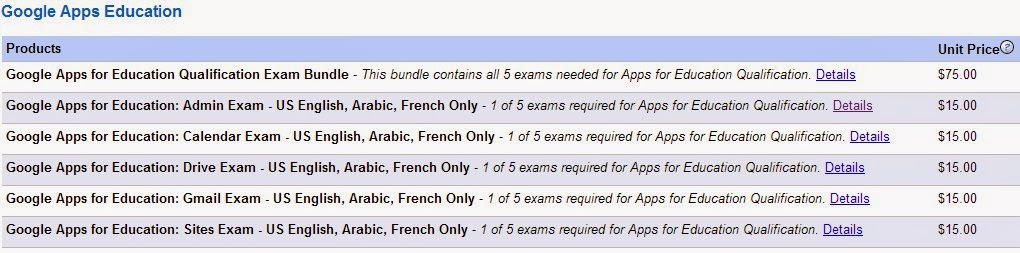
During the fall of 2012, I completed the coursework, paid for and passed the 6 qualification exams (you have 90 days to complete the tests). On December 4th I was awarded Google Apps Qualified Individual status.

Since then, they have (supposedly) updated the tests to reflect the recent Google Apps updates. There are now only 5 tests that can be taken for $75 in English, Arabic or French.

After becoming a Qualified Individual, I had one year to complete the Certified Trainer application. I started working on the application in October/November. Since it is a Google Form (and therefore not savable), I kept all the answers to the questions in a Google Doc so that I could simply copy and paste when the time came. I made sure to share all my documents so that anyone with the link could view them.

The hardest parts for me were the two videos. Luckily I had used the COETAIL course 3 final project as a rough draft for my about me video. The most difficult thing was getting my videos cut down to the under 2-minute requirement…it goes by fast!

I recently discovered FormMule and have found it incredibly useful for disseminating information during my PD workshops.

There were a few hiccups in submitting my application. I started trying to submit by application on December 4th (the 1 year anniversary of my Qualified Individual status). However I kept getting an internal server 500 error. I was freaking out a little! Luckily I found the Google Apps for Education Certified Trainer forum. Becky notified me when the applications were back up (December 10) and assured me that I would not be penalized for submitting ‘late.’ Applications are currently not being accepted again for the first 8 weeks of 2014.

I can’t wait to explore the GACT community and see my name listed on the ‘Find a Trainer‘ site! Although I’m not super into badges, I have no problem displaying my new badge over there in my right sidebar 😉 And I’m proud to be officially considered ‘Googley’ (“Definition of “Googley” (according to Google) – Googley people are creative, passionate about their work, and ethical. They communicate openly; can thrive in a fast-paced, rapidly changing environment; and are willing to “roll up their sleeves” and get things done. They can be serious without wearing a suit and tie. Googley people can be worldwide experts and still encourage curiosity and questions without being condescending.”)!

Professional Development

I’m officially a Google Apps Certified Trainer!

Cross posted from my other blog.

EEEK!! I’m not going to lie – I’m super pumped about this! After more than a year of working on this application, it’s officially official 🙂

During the fall of 2012, I completed the coursework, paid for and passed the 6 qualification exams (you have 90 days to complete the tests). On December 4th I was awarded Google Apps Qualified Individual status.

Since then, they have (supposedly) updated the tests to reflect the recent Google Apps updates. There are now only 5 tests that can be taken for $75 in English, Arabic or French.

After becoming a Qualified Individual, I had one year to complete the Certified Trainer application. I started working on the application in October/November. Since it is a Google Form (and therefore not savable), I kept all the answers to the questions in a Google Doc so that I could simply copy and paste when the time came. I made sure to share all my documents so that anyone with the link could view them.

The hardest parts for me were the two videos. Luckily I had used the COETAIL course 3 final project as a rough draft for my about me video. The most difficult thing was getting my videos cut down to the under 2-minute requirement…it goes by fast!

I recently discovered FormMule and have found it incredibly useful for disseminating information during my PD workshops.

There were a few hiccups in submitting my application. I started trying to submit by application on December 4th (the 1 year anniversary of my Qualified Individual status). However I kept getting an internal server 500 error. I was freaking out a little! Luckily I found the Google Apps for Education Certified Trainer forum. Becky notified me when the applications were back up (December 10) and assured me that I would not be penalized for submitting ‘late.’ Applications are currently not being accepted again for the first 8 weeks of 2014.

I can’t wait to explore the GACT community and see my name listed on the ‘Find a Trainer‘ site! Although I’m not super into badges, I have no problem displaying my new badge over there in my right sidebar 😉 And I’m proud to be officially considered ‘Googley’ (“Definition of “Googley” (according to Google) – Googley people are creative, passionate about their work, and ethical. They communicate openly; can thrive in a fast-paced, rapidly changing environment; and are willing to “roll up their sleeves” and get things done. They can be serious without wearing a suit and tie. Googley people can be worldwide experts and still encourage curiosity and questions without being condescending.”)!

COETAIL, Professional Development

What I’ve been up to lately: #COETAIL edition

I realized I haven’t really blogged much at all this semester. While there are a few reasons for that, one of them is that I’ve been putting a lot of time into my M.Ed. So here’s what I’ve been up to lately! [see also part 1: UKSTL edition]

I just wrote my last post for COETAIL course 4! This semester: three classes down, 1 to finish up. I had 2 COETAIL classes this semester – courses 3 & 4. Courses 1 & 2 weren’t too challenging for me so I’m happy to report that courses 3 & 4 did the job! I learned a few new things, was forced to think deeply and had some great discussions.

Course 3 – Visual Literacy: Effective Communicators and Creators
All of my posts from the course can be seen here. My two favorite posts were redesigning a powerpoint and my digital story (which I used as a first draft for my Google Apps Certified Trainer application). Although I’d thought about visual literacy in the past (mostly because of my husband) it was rewarding to dive a little deeper and actually create/recreate.

Course 4 – Technology: A Catalyst for Learning
All of my posts from the course can be seen here. I really really enjoyed how this course made me think…hard. I was passionate about all the posts and loved the discussions had during this course. UKSTL rubbed off on me a bit and I went the research route with my post on Gamification. It’s definitely my most commented on post and the author of one of the articles I quoted even participated :). Go take a look and add your own! I finished up the course with a brainstorm for my course 5 (Alive in the Classroom: Applied Web 2.0 Technology for Learning) final project. I’m hoping to help our middle school art teacher create a photography unit using the MYP design cycle that hits the redefinition level.

As always, I’d love input! What do you think about the redesigned presentation? Do you have any ideas for MYP design cycle & art?

Google, Professional Development

Work smarter, not harder

The bottom line for educators and technology (not tech integration) usually seems to be saving time. If it’s going to make my life more difficult – no thank you! But if I can utilize technology tools to make my life easier – tell me more! This is one of my favorite ways to get educators to buy in to Google Apps.

I recently discovered a script for spreadsheets that has changed how I collect and distribute information when I’m giving PD. It’s called formMule. Just as the name implies it does tons of work for you (saving you tons of time). While there are lots of ways to use it (most I haven’t yet discovered) I’ve been loving it to send out resources from my professional development sessions to the attendees. I’ve now used it 4 times and have had great success.

At the beginning (or end) of a PD session, I have teachers complete a short Google Form. Once they have submitted the form, they instantly receive an email from me.formMule auto email

I have to do a little work up front to set everything up, but it saves me enough time in the long run to make it completely worth it. The short video below is one I made for my Google Apps Certified Trainer application quickly showing how to set up the basic mail merge function.

Have you used formMule’s other functions? I’d love to hear about what else it can do!

Kuwait, Professional Development

Visual interpretation in the language B classroom

Yesterday I attended the MS/HS language B department meeting. We have both MYP & DP Language B offered in Arabic and French. One of their criterion is Visual Interpretation. The teachers wanted to learn about a few ways they could create posters (etc) for summative tasks for their students. After doing a little research, I decided to highlight 4 tools: PS Touch, Glogster, ThingLink and Tumblr. Below is the follow-up email I sent out this morning. I would love to hear about how you and your students create visual interpretation tasks & summatives in your MYP or DP language B classes! 

My reflection: First – why not use authentic realia for visual interpretation tasks? The power of language B is that it is alive and real in the world. Second – as a language B teacher and technology integration lover, my mind goes to what can my students create. The tools I presented can simply be used by staff to create tasks for the students but the real power comes when the tasks can be transformative.

  • Students create their own media (or find Creative Commons licensed media).
  • Pictures are edited using Photoshop (Instagram?) and videos could be uploaded to YouTube.
  • This media is then be used to create Glogs and/or ThingLinks.
  • The next step (towards redefinition) would be to compile the media into a Tumblr blog where students could document the journey of their visual, reflect on their visual and others’ and get input from the teacher, classmates and people around the world.

Good morning!

Thanks for letting me stop by your department meeting yesterday. I hope the tech tools you saw gave you a few ideas for visual interpretation in your classrooms. When I chose them I thought that they could be used by teachers or students to create visuals. These tools range from augmentation (PS Touch) to the possibility for redefinition (Tumbr). If you’ve found other tools, please don’t hesitate to share! Let me know if you have any questions. 🙂

Creative Commons Search – a great place to start to find media (photos, videos, audio, etc) that you are allowed to use (not copyrighted).

PS Touch (school iPad app)

  • No account needed.
  • Can create visuals with text from basic to advanced.
  • Tutorials built into app.
  • Students can email photo and/or print (or export to use in one of the options below).

Glogster (create & view on computer, view only on iPad)

  • You must create an account.
  • There is a free version that includes a 31-day premium trial.
  • Students should use Glogster.com to create accounts.
  • Great for students or teachers to create.
  • Choose your editable template. Add text, graphics, images, audio and video. Save & share the link. Can be printed.
  • CAN view on iPad (with free app) but cannot create.

ThingLink (also a free app)

  • You must create an account.
  • Great for students or teachers to create.
  • Can create and view on both computer & iPad.
  • Add an image. Then add ‘tags’ to insert text, photos, web links, music or videos. Share & save the link. Not ideal for printing.
  • Cool example

Tumblr (also a free app)

  • You must create an account.
  • You can have multiple ‘blogs’ per account.
  • Best for students to create on-going visuals throughout a unit.
  • Add text, photos, quotes, web links, chats, audio & video.
  • Students can share the link to their Tumblr blog with teachers. Not ideal for printing.
  • Has potential for redefinition (SAMR).