Google, iOS, Kuwait

Google Earth in lower elementary

Last weekend at the Middle East GAFE Summit, I had the pleasure of meeting John Bailey and attending one of his sessions on Google Earth. The man knows his stuff! While I was at his session, I was finally inspired to share an idea I had for the KG2 teachers recently. I’m sure John could embellish it and make it much better (as he found out he was selected to attend the next Google Teacher’s Academy while we were there..congrats John!) but I do what I can. 😉

During the 3-hour planning meeting for the IB PYP KG2 unit, it was mentioned that in the past students have looked at their food wrappers to see where their food comes from. I thought this would be a great way to incorporate Google Earth!

After students find out where their food is from, the teacher could create a placemark for each student/food item. Instead of just creating simple placemarks, I went one step further  and inserted pictures. I took a picture of the food item using my iPad. I then created a secret board on Pinterest (using the iPad app). On my computer, I copied the image URL of the picture on Pinterest. In the placemark, I clicked ‘add image’ and pasted the URL. You could also put the pictures on your website…you just need to be able to get the image URL. If you want to get really awesome, you could mess around with Tours and create a video of all the placemarks.

Although you cannot create placemarks on the iPad (that I’ve found…let me know if you figure it out!), you can open your Trip on the iPad. I emailed myself the Google Earth attachment (you can also upload it to your Google Drive) and was able to open and view it on the iPad. Students can now actually SEE where their food came from! Pretty cool, huh?

(I couldn’t get the embed gadget to work for the Google Earth file. Feel free to open it in Google Earth! Merci to Jeff for his modeling skills 🙂

Note: I did not receive any compensation for this review. Just my honest opinion & experience.

Collaboration, Google, Kuwait, Professional Development

UAE #GAFESUMMIT 2013

Jeff and I headed to Dubai for the first time last week to attend and present at the Middle East GAFE Summit. It was everything we hoped it would be…and more (I know, so cliché but so true!).

Both of our presentations were on Thursday. In the days leading up to the Summit, I reached out to my PLN to help show the power of global collaboration. Everything went extremely well and I’m incredibly grateful to everyone who attended my session and collaborated on the document with us (feel free to keep adding to it)! I’ve embedded my presentation slide deck below. You can also check out my website for Conjugating Google Docs in the World Language Classroom.

The last session of the Summit was a demo slam. I’ve seen demo slams before but never participated. I found the courage inside (maybe the biggest group  of people I’ve ever presented to) and did a slam of Google Story Builder. I asked the crowd to help me create a story and we had fun story written and ready to share in under 3 minutes! If you use this in your classroom, I’d love to see how! The slam was a competition but I wasn’t in it to win it…just wanted to have the experience and do some sharing! The other presenters were a great group and we had fun slamming!

We met a lot of new people – it was extremely refreshing to be in Dubai and hang out with like-minded educators. We also attended several quality sessions. If you weren’t able to make the summit, all the session resources are online and Jeff Genest was kind enough to set up a Google Spreadsheet to collect all the #GAFESUMMIT tweets! The next summit is in Virginia next weekend so be sure to check out the resources and hashtag for more fun stuff.

COETAIL, Kuwait, Professional Development, Reflector

I’m still here

I’ve been kind of absent on here. Instead I’ve been busy traveling, planning PD and reflecting for course 1 of COETAIL.

We’re still having Reflector issues and it’s not yet been rolled out for our entire staff. I’d love to get everything solved this year so we can make it 100% available next year.

Jeff and I are heading to Dubai next weekend for the Middle East GAFE Summit. I’ll have my presentation up for viewing pleasure next week.

I also have some draft posts that I need to finish. My goal is to finish those before we head to Thailand and NESA for Spring Break.

Kuwait, Professional Development

Teaching: A Love/Hate Relationship

Recently I read John Spencer‘s two part series “What I Forgot When I left the Classroom” (part 1, part 2). I’ve been thinking about my place in education ever since.

I grew up in a family full of educators and vowed I would never be a teacher. I majored in Chemistry and minored in French at college. I dabbled in working on a dude ranch, in a pharmaceutical lab and as an English assistant in France. I followed my husband to South Carolina and was substitute teaching while looking for a job in a chemistry lab. When a job to teach high school French fell in my lap, I took it. We needed money and I needed a job.

Three and a half short years later I’m certified to teach Chemistry and French but I’ve left the classroom. I’ve also moved halfway around the world to Kuwait. I’ve grown a ton as a person and would (mostly) do it the same again. I haven’t forgotten what it’s like to be in the classroom and have even had the chance to teach some French this year. And I don’t know if I can go back. I’ve thought a lot about it and have created a short list…

Things I miss about the classroom:
1. Students. And the relationships that we were able to foster during 3 years of being “together.”
2. The ah-ha moment when a lesson comes together perfectly!

Things I don’t miss and still have nightmares about:
1. Grading.
2. The hard work of creating relationships with students.
3. Managing a classroom and cultivating respectful individuals.
4. Hours and hours spent lesson planning.
5. Creating tests and giving them.
6. Grading.
7. Proctoring standardized tests.
8. Interacting with angry parents.

The list could go on and I’ll probably add to it in the near future. I’m young and my career is in its toddler stage, but I still wonder about what the rest of my professional life will look like. Will I feel the pull back to the classroom? Will I stay involved with education technology? Will I stay in education?! I look forward to seeing what life has in store for me and looking back to see how I’ve grown.

For some other recent reflections…Sunday & today.

iOS, Kuwait, Professional Development

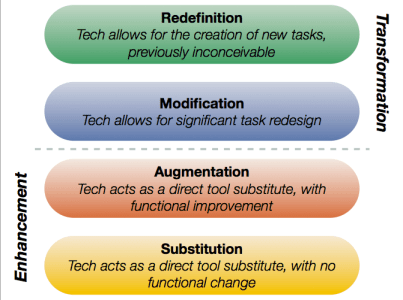
A Reflection on Tech Integration – SAMR

I’ve been struggling a lot lately with this whole technology integration initiative that is sweeping the world. Yesterday Jeff and I went into a 1st grade classroom to help them create word-webs and stories using their iPads. It didn’t go as smoothly as one would hope and by the end we were wondering if the technology made the project better.

This morning we were truly challenged as Technology Coaches – two elementary teachers are starting their final project for COETAIL and need to integrate technology into a unit plan. Unlike many teachers that we come into contact with they know about SAMR and want to attain the Redefinition level.
This is what our job is supposed to be…right? Integrating technology in a way that redefines education? I honestly can’t say we’ve done a ton of that this year. I often wonder how many technology coaches (or whatever you’d like to call us) are truly helping teachers CHANGE education through the use of technology. I’m not naive enough to think that it can happen for every task that a student completes…but how about once a unit? Once a month? I’d take once a year! So many people (me included) are quick to make suggestions for integrating technology (in our case iPads) – make movies, use Explain Everything, write blogs, etc. How often do we stop to think…and ask ourselves “Is technology making my lessons better?” and “Where am I on the continuum?” I’ve sat around tables with teachers who truly believe that they are redefining & transforming education when they are simply at the substitution stage. I am just as guilty of this too! There are thousands of education blogs out there boasting about the latest and greatest way technology is “changing” their classroom. But is it really?

So where do we (me, my school, you, your school, educators around the world) go with this? How do we ensure that technology isn’t just a band-aid? I’ve had this discussion with Jeff countless times. But how do we have this discussion with other teachers without stepping on toes and hurting feelings? We haven’t introduced the SAMR or TPACK models to staff yet because we think they’d be a little overwhelmed (have you read Nicholas Provenzano‘s rant?). We are also in limbo waiting to hear what our iPad initiative will look like next year. Do we introduce these models? If so, when?

Quality technology integration isn’t easy. It’s takes time, patience and lots of brain power. It takes CHANGING the way we teach. Are we ready for that?

Get started redefining…
Exploring the SAMR model (ECISD Technology)
Brief Intro to TPCK & SAMR (Dr. Ruben Puentedura)
Technology in Education: A Brief Video Intro (Dr. Ruben Puentedura)
More on SAMR (Dr. Ruben Puentedura)
Elementary example of SAMR
TPACK
TPACK Explained

This is in no way a complete list…please feel free to share more!

1:1, Collaboration, iOS, Kuwait

A Reflection on Tech Integration – Grade 1

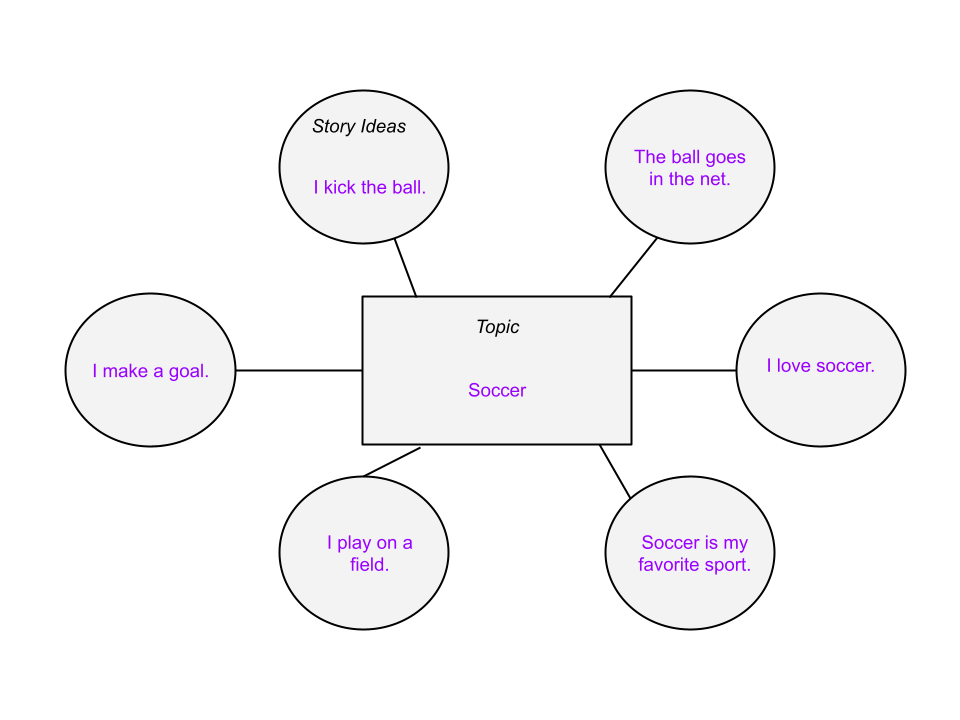
A couple weeks ago a 1st grade teacher emailed us wanting to discuss how she could use the iPad in her lessons. I was the only tech coach available so I invited her up to the office. When I asked her about her objectives, she explained that she wanted the students to create word-webs to brainstorm for a story and then write their stories (individually). She wanted to give those with the iPads the option of using the iPad to brainstorm and create their stories. The two apps on our iPads that might be simple enough for 1st graders to create stories are Explain Everything and Keynote. We decided that my first session with the students would be to “teach” them how to use Explain Everything through the creation of their word-webs. I would then go back into the classroom a second time to help them create their stories.
Session 1 Reflection:
Jeff came with me to help teach the 10 students with iPads how to use Explain Everything. While we were with the iPad students, the teacher was in another part of the classroom with the rest of the students. Students without iPads were given a paper template to create their mind-maps. Students using Explain Everything had to create their own shapes before starting their brainstorm. It didn’t go quite as smoothly as one would have hoped.

After class, Jeff and I discussed how we could have done it differently. We knew we couldn’t just teach 1st grade students how to use Explain Everything through direct instruction. BUT the students were quite distracted by the technology. Many of them created great brainstorms, others never got past the stage of drawing their shapes. Looking back on it I would have changed several things:
*all students start with the classroom teacher to talk about brainstorming and create a class mind-map.
*all students make their first draft of their mind-map on paper using the teacher-created template.
*students with iPads then re-create their mind-maps using Explain Everything (with assistance from tech coaches).

Does this process take longer than without using technology? Yes. Is using technology making their stories better in the end? Maybe. That’s a big maybe and depends a lot on how the students use Explain Everything. When I was in the classroom my lesson plans involving students using technology usually took longer so students could become comfortable with the technology (device, app, etc). But the ultimate goal was to save time in the long-run and end with a better product and a deeper understanding of the concept. In revising this 1st grade lesson, students would be repeating the process of creating their mind-map (once on paper, once in the iPad). Maybe students would revise their paper draft when creating the iPad draft, allowing them to think of better ideas. The major purpose of the second draft would be getting them comfortable with Explain Everything so that they could then use the app to create their stories.

Session 2 Reflection:
Jeff and I went back into the classroom today to continue helping the students use their iPads to create stories. We thought we would mostly be helping them transfer their ideas into stories however the majority of the hour that we were there was a continuation of creating their word-webs. Once again students were distracted by the technology. By the end of the hour, most of the students with iPads had moved on to turning their ideas into stories. We weren’t exactly sure what the stories were supposed to look like, so we had students add slides to their Explain Everything word-web and write 1 sentence per slide.

After leaving the classroom Jeff and I began immediately debriefing and reflecting on the project and instruction. Did the technology cause the students to create better projects? No. The projects were of equal quality, if not worse, to what the students using paper created. Does this project still have potential to create something better? Maybe. After the students have finished their stories (with 1 sentence per slide), they could use the record feature of Explain Everything to make a product that the other students would not be able to make. Students would then have original stories (writing), with their own narration (reading) and the videos would be able to be shared with other students and parents. Is this possible in a 1st grade classroom? Maybe…with lots of practice and patience!

As technology coaches we need to make sure that we are always encouraging our teachers to use technology when appropriate. It is a TOOL that should be used when it is the BEST tool for the job. If paper and pencil are the best tools for the project…that’s okay! There is a fine line between quality technology integration and superfluous technology integration.

1:1, Collaboration, iOS, Kuwait, Professional Development

Getting back in the swing of things!

Wow it’s been a long time since I posted anything! 2013 had a great start – we were home in MI for Christmas & the New Year and my sister, Abby, came back to Kuwait with us! She is substitute teaching for the semester and just signed a contract to come back next year to teach Pre-K. We’re pretty excited to have a little bit of home here 🙂

One of our biggest challenges as technology coaches this year has been getting teachers on board and actively incorporating technology in their classrooms. There have been a lot of ups and downs with our 1:1 iPad initiative and I don’t think teachers really know what to think – should they invest their time or is it all going to be for naught? Students currently have to pay a fee to acquire a school iPad and gain access to the wireless network. We’re not exactly sure on the numbers but somewhere around 40% of our student body (~2000 students PreK-12) have iPads. This presents many obvious logistical problems for classroom teachers.

As a tech coaches, we’re trying to decide where to focus this semester  Last semester we offered Professional Development after school on Mondays. Although our turnout was good at first, the numbers slowly diminished. We set up a website, but we’re not really sure if our staff actually uses it. Plus we’re still trying to figure out the dynamics of working in a 3-person team.

For the most part our job this semester has become more individualized. The principals sent out an email for us and we’ve appeared at a couple meetings, but we’re trying the let-them-come-to-us method. We don’t want to offer PD that teachers don’t want or won’t come to. But we DO want to support our staff. We’ve been encouraging teachers to give students choice for assignments and allow them to use the iPads. Teachers (individually and in small groups) have started coming to us more to help them plan units & lessons, create their class websites or blogs and support them in the classroom during lessons.

Whenever I get frustrated or down I just try to remember that this is a growing year. I wasn’t involved in the process until we arrived in August (and I’m not always consulted now) so we all just have to work with what we’ve been given. We have some students with iPads which isn’t the ideal 1:1 ratio however it’s much better than most other schools in Kuwait (who don’t even have wi-fi). I’m looking forward to seeing how everything turns out in the next couple years 🙂

Reflector Update:
We’re still in the testing phase of this project. The 5 elementary teachers that are using the app aren’t having great success. We know that it’s not our network or the app itself (I have success using the app on my 2012 laptop connected to the school wireless) or the wireless adapters (we bought & installed 2 new ones with no success). We now think that it might have something to do with the computers that teachers are using (low RAM, etc). We’ll be continuing to investigate during the next couple months!

Some fun events coming up this Spring:
*Jeff and I will be starting our masters with COETAIL on February 4th
*Abby, Jeff and I will be traveling to Greece at the end of February for a long weekend (National Liberation)
*My brother and his girlfriend are coming to visit us in March for their Spring Break
*The three of us will also be traveling to Thailand and attending NESA in April (Jeff is presenting!)

If you’d like to read more about our lives outside of school, feel free to check out our other blog. 🙂

Collaboration, Google, Kuwait, Professional Development

Presentation x2 from #Peak2012

Last weekend I attended and presented at the Professional Educators Around Kuwait conference (PEAK). Calls for presentation proposals went out last month and I had a difficult time deciding what to present about. My husband suggested I choose something I was passionate about…so Google Apps it was (duh!). A colleague helped me refine my ideas and off I went!

I had no idea what to expect from this conference. Honestly, I didn’t expect a whole lot. The rooms did not have projectors or internet (I brought my own). There was no keynote, simply 4 sessions with lunch and a raffle afterwards. When I got the HUGE document with the descriptions of the sessions I didn’t think there was any way that there would be enough people present to attend them all. Turns out there were close to 1500 educators from over 30 schools! After my 2 presentations, I attended a session on ‘Arabish‘ and a second session on strategies for teaching students are are English Language Learners. Both were decent but learning about Arabish was incredibly interesting, especially after taking an intro Arabic course this semester. The buffet lunch was fantastic and I even won a tea set at the raffle 🙂

My first session was ‘Harnessing the Power of Google Apps: For Educators.’ I focused on using Google Apps in order to make educators’ lives easier and save them time (Google Apps basics).

My second session was ‘Harnessing the Power of Google Apps: For Collaboration.’ This session assumed that you attended my first session or had a basic understanding of how to use Google Apps. I focused on effectively using Google Apps in order to facilitate and encourage collaboration among teachers and students.

I think these sessions could be combined into a 3-hour workshop where all participants had devices (preferably laptops or Chromebooks). The biggest false assumption that I made was thinking that teachers would bring devices to an education conference and, specifically, to a session on Google Apps. I learned that this was not the case in Kuwait. Many participants had devices, but mobile devices (including iPads) are not optimized for using Google Apps effectively.

My sessions have been submitted to NESA for consideration to be included in the Spring Conference in Bangkok. Our plan is to go to Thailand for Spring Break either way…so it’s a win-win!  I would love any feedback about these presentations for the future 🙂

1:1, Google, iOS, Kuwait, Reflector

An Update: @ReflectorApp

As I mentioned in a previous post we bought a Reflector (formally Reflection) license for each of our teachers. In that post I laid out some issues. Here are my updates to how things have been going!

*We are rolling out Reflector slowly. I chose the first 5 teachers from elementary based on who I’ve worked with and after talking to the principal. We have one teacher in each grade (1-5) testing out Reflector.
*Before teachers could use the app, I met individually with each of them to show them how it worked. They have to connect to the wireless (instead of wired), open the program (it runs in the background), activate mirroring using AirPlay on their iPad…et voila! I showed them how to change the settings (white or black frame) and set a password (a MUST!).
*I created a Google doc for teachers to share their experiences with Reflector. They are busy people and don’t have time to meet weekly so I thought this would be a great use for Google Apps 🙂 Although you can’t see them (this is a copy), I add comments when teachers share their experiences.

As you can see our biggest problem right now is the glitchy mirroring. We are doing some experimenting to figure out which piece of the puzzle is causing this (app, wireless network, computer, wireless card…). When I use my new Lenovo laptop on the school network I have no issues. Teachers, however, are having issues (same network, different computer). My scientific brain tells me that this could be pointing to the wireless card. We bought two new cards (one internal, the other a USB) for the grade 4 & 5 teachers to test out.

(From my previous post) Some issues we’ve already encountered:
*All computers using reflection will show up on AirPlay on the iPad (if there are 100 computers with Reflection, you will be able to see and choose from all 100). Update: So far this hasn’t been a problem (we only have 5 running). When I met with each teacher, I taught them to exit the Reflector application and disconnect from the wireless when they weren’t actively using it. Even when we roll this out to more teachers, I doubt all 170 will need to use the app at the same time.
*We are running Windows 7 32-bit Professional. When Reflector is installed & authenticated on the admin profile, it is not authenticated on a teacher profile (prompts you to enter license serial code again). Update: After contacting the support team, they gave us the step-by-step for setting up Reflector on each computer so that anyone who logs in can access the app. I have been INCREDIBLY impressed with their customer service. They are quick to respond when I ask for help and are keeping track of my blog & Twitter to make sure everything is going well.

I’d love to hear about other schools that are the implementing Reflector App! Are you having any issues? What is your hardware/wireless network like?

Note: I did not receive any compensation for this review. Just my honest opinion & experience.

Google, Kuwait, Professional Development

I’m a #GAFE Qualified Individual

I’ve been using Google for personal email for 10+ years. I worked at a Google Apps for Education School and had a classroom that was 1:1 with Chromebooks. I’m now a Technology Coach in a school going 1:1 with iPads. I still use Google Apps daily for personal and professional reasons. So in September I decided I wanted to do some PD on my own time. Three months, countless hours and 6 multiple choice exams later…I’m officially a GAFE Qualified Individual 🙂 YAY!

Even though I’ve been using Google Apps for(what seems like)ever, I learned a ton of new tricks! I tweeted about most of them using #gafe. Here are just a few…

The modules are available (free) for anyone and are specifically geared towards education. Whether your goal is to become a certified trainer, to use GAFE in the classroom or to simply learn a few of Gmail’s sweet tricks…the edu training is a great place to start. The modules are published Google docs so that they can be updated at anytime (cause we all know Google is constantly updating!).

Now that I’m a Qualified Individual I have 12 months to complete the application to become a Certified Trainer. It’s definitely a lot more work than reading through a few modules and taking a couple tests. Although my school does not use GAFE, there are still quite a few teachers here who are using (or are interested in) Google Apps. Last weekend I presented 2 sessions at a conference in Kuwait and will hopefully be able to present at the GAFE Summit in Dubai and/or NESA in the spring.

Becoming a Qualified Individual is one of the ways I’ve been trying to better myself as an educator in 2012. 🙂

Update: I received an email with some additional (great) questions. I thought I’d share them and my answers here in case anyone else is asking the same questions. 🙂

Q: How many questions are on each of the 90 minute tests?
A: Each test has 60 multiple choice questions. I don’t think any of them took me more than 70 minutes to complete.

Q: How much time do you recommend dedicating to studying for each of the tests?
A: I simply read through the modules given by Google. I experimented with some of the tools and tricks as I read through them. None of the modules took longer than the time suggested by Google, but I’m familiar with all of the products so I may have gone through them faster than people who haven’t had experience with Google Apps.

Q: What study material would you recommend (outside of reading through the info on Google’s Apps for Education site — and having that information open in a second window while taking the test)?
A: The tests are tricky. I firmly believe that Google is testing your search skills more than they are testing your information retention skills. The questions are very specific. During each test I had all the chapters of the relevant module open in another browser and searched to find or double-check my answers. Google gives you everything you need for free. I wouldn’t recommend seeking out or buying any other additional materials.

I’ll add more Q&As if I get them!