1:1, iOS, Kuwait, Professional Development

iPad PD

We (the technology coaches) started going into the elementary classrooms last week to give mini-iPad lessons before the students get their iPads. I’ve been in classrooms from KG1 (3-5 yr olds) to grade 3. It’s definitely been a learning experience! We’ll continue to go into ES classrooms throughout the next week. I’ll also be subbing for the Language B department head Sunday through Tuesday. I’ll be teaching her DP1 and DP2 classes. Guess I wasn’t quite done 😉

We’ve also started planning PD for the teachers. We asked teachers to complete a needs survey so we could tailor our offerings throughout the year.

About half of our staff completed the survey and @MrLaymanSS made a nice infographic in order to share the results with the admin team.

Starting on Monday, we’ll be offering staff 3 levels of iPad Tips & Tricks and teachers will be ablle to choose which they’d like to attend. I’ll be facilitating the level 3 sessions…any iPad or iOS6 tips & tricks would be much appreciated!

I’ve been working on a Google presentation (will share later), but today I decided to download the Reflection App. I tried the free version first and went to my twitter PLN before paying the $15 to get the full version. I got good input (merci beaucoup!) and decided to go for it. It seems completely worth the price and I’m eager to experiment with it! The first video I created is for my upcoming level 3 PD showing teachers how to create an appointment in the calendar app. Would love feedback 🙂 Enjoy!

Chromebooks, Collaboration, Google, Professional Development

Gatorade, Google, Sweat & Social Media #scms12

Day 1 is officially over! Although we didn’t win the Chromebook at the end of the day, it was a decent day. During the keynote by Jaime Casap I found myself nodding along with almost everything he said. To see what people were saying during Jaime’s keynote (and throughout the day), click here.

My session was immediately after the morning keynote. During my 2 years of coaching high school Track & Field, I initiated using social media and google apps with the other coaches, the athletes and the parents. I had a lot of great success! These ideas could also be used for any school group (magnet programs, clubs, after-school programs, etc). I included several links this morning, including one to the ‘fake’ team website. Below is my presentation…enjoy!


My husband also did a session about classroom management in a 1:1 environment. I heard it was a must-attend! #proudwife

Chromebooks, Collaboration, Google, Professional Development

South Carolina Midlands Summit #scms12

Good morning!

Today and tomorrow mark our last 2 days working with our school district before heading out. We will be attending (and presenting at) the SC Midlands Summit. I’m incredibly excited that we have such a great opportunity right in our own backyard! I know a lot of work went into putting this conference together and I’m incredibly proud to have worked with the women who orchestrated it (MaryAnn, Donna, & Pam).

Later I’ll be posting my presentation:
Gatorade, Google, Sweat and Social Media
Ever feel like coaching is taking over your life? In this session you’ll learn strategies to utilize Twitter, Facebook & Google Docs to save time, become more effective communicators and better coaches, regardless of the sport.

But for now…check out what you’re missing and follow along!
#scms12
Featured Speakers
Wednesday Sessions
Poster Sessions
Thursday Sessions

1 Two 1, Collaboration, Google, Professional Development

Let’s take a step back

So I’ve talked a lot about our district going 1:1 but I haven’t given many details. Implementing 1:1 in a district of 25,000 students and 30+ schools is a big undertaking! So here are some of the logistics…

*all schools are site-based. So the district office gives recommendations, but the schools (principals) have the final say. This applies to devices chosen, professional development, discipline policies, etc.

*K-2 will NOT be going 1:1, grades 3-8 will be going 1:1 by grade level and high school will be going by thirds

*Phase 1 (February 2012) – grades 5, 6 and 1/3 of each high school (based on student population, ~26 teachers at my school). Phase 2 (August 2012) – grades 4, 7 and next 1/3 of HS. Phase 3 (TBD 2013) – grades 3, 8 and last 1/3 of HS. At this point high schools MAY allow devices to go home instead of classroom sets.

*all high schools & elementaries chose Google Chromebooks, middle schools have chosen a variety of devices (iPad, Android tablet, Chromebooks)

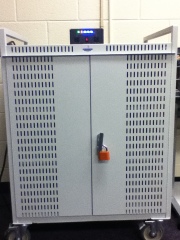
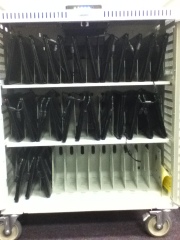
*all high schools & elementaries have carts for 1:1 teachers with class sets, middle schools are doing homeroom models and also allowing students to take devices home
20120316-065849.jpg

20120316-070019.jpg

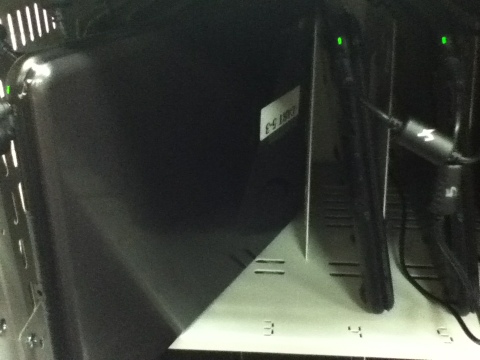
*Before we ever saw our Chromebooks, our Integration Technology Specialist (ITS) (Tami) had her work cut out for her! She received over 700 Chromebooks. Each one was assigned to a class set (district asset & serial numbers were recorded), set up to the network (we have a special Chrome wireless network), labeled and inserted into a cart.
20120316-071435.jpg

*Tami created (and shared) a google document with all of this information so that we (teachers) could assign Chromebooks to students (my students use the same CB every day). The original spreadsheet includes information for all teachers.

*Tami started holding professional development for the 1:1 teachers at my HS in late fall. We received our locked carts in nid-February. We were required to attend a full day of PD on March 1st to obtain the code to unlock our carts. Unfortunately we didn’t get to all of the following agenda (everything took much longer than anticipated!). I helped present the session on “Unlocking the Chromebook Power” using an adapted version of my SCLFTA presentation.

*The morning was spent determining which CB numbers (1-27 for my cart) matched the asset tag info that Tami collected (see above spreadsheeet). I exported rosters from my PowerSchool gradebook then copied and pasted my students names and ID numbers into a Google spreadsheet for each class. I then assigned each student to a number (alphabetical order) and converted their ID numbers to email addresses.

*This full day of PD was priceless because we were given useful information and the TIME to do things that we needed to do. I adapted my rules presentation (from Tami) and my user agreement.

*Among other information, we also viewed and discussed the discipline policy. As we go 1:1, I think it is extremely important to have consistent consequences and hold students accountable. Below is an example from another high school in our district.

Whew that was a mouthful! But implementing 1:1 on this scale (or anywhere) is such a huge undertaking 🙂

1 Two 1, Google, Professional Development

#google #chromebooks debut tomorrow!

Time flies so fast! I can’t believe it’s already been so long since I last did a real post. We were lucky enough to have a mid-winter break last week. Probably the most amazing invention ever. Christmas break to Spring break always seems sooo long and drags on forever. Having a week off in February was beneficial for everyone involved (in my humble opinion). My husband and I travelled to San Francisco for a little work & play.

This week, I’ve been getting back in the hang of things AND getting ready for my classes to go 1TWO1 with Google Chromebooks. I’ve had a cart with 27 beauties sitting in my classroom for a couple weeks, but I didn’t have the combination to the lock 😦 Today I spent the entire day in professional development with the rest of the teachers in phase 1 getting ready to roll out the Chromebooks. I’m excited to have access to another digital tool! But I do want to make it clear that just because I have them, doesn’t mean we’ll be using them everyday all the time. They will just be another tool in our box in my classroom.

I got a lot of thinking and planning and learning time today, but I still have lots to contemplate. The desks in my room probably aren’t ideal for 1:1. I don’t really have any idea what I’m going to do. I want an arrangement that is flexible (not ONLY for tech) but also allows me to keep an eye on what my students are doing. Tomorrow I think I’m going to introduce the Chromebooks & Google OS, talk about proper behavior and have the students do a scavenger hunt in Google Docs.

This is exciting, but overwhelming at the same time! I’ve been teaching for 2.5 years and I’ve incorporated a lot of technology in my classroom. But being 1:1 involves a complete mind shift. I want to put the technology to it’s BEST use and not use it as another (online) worksheet for my students to do. I want to be at redefinition in all my lessons! But I know it’s a slow process and I need to remember that 🙂 It’s time for me to get out of my comfort zone and spend time figuring out what my classroom & lessons will look like. My goal is to have my students producing great work that they are proud of (and I’m proud to show off) while actually learning and understanding French language (and culture). That’s not too much…right?

1 Two 1, Collaboration, iOS, Professional Development, Social Media

#SCFLTA2012

Today was the 2012 South Carolina Foreign Language Teacher’s Association Conference in Columbia. The theme was “Got Connections? Communicate, Collaborate, and Innovate!” I was lucky enough to be chosen to present a session! This is the first time I’ve presented by myself at a large event. I was super nervous, but I think it went pretty well!

Here is the handout I gave (I also made it available in editable Word & Pages form). Below is my presentation (full of links!). I used Google presentations and my ChromeBook to present. Love this thing! Happy Saturday!

1 Two 1, Collaboration, Google, Professional Development

Pros, Cons & Web 2.0

The teachers that have been selected to go 1:1 in January must complete 20 hours of professional development. We started yesterday morning. Our first assignment was to add at least 3 blogs to our google reader (done that!). Our second assignment was to create an introduction using google presentations. Here’s mine. (I couldn’t get it to embed 😦 )

Would love to hear any other positives or negatives to going 1:1!

Our 3rd assignment is to pick our favorite web 2.0 tool and share it. I got some really great ideas on twitter yesterday! Always looking for more to share with other teachers 🙂
Mme Nero (@MmeNero)
LeydenASCI (@LeydenASCI)
Technology in MFL Classroom (@LeydenASCI)

There are just so many to choose from now I’m a little overwhelmed. But I’m excited to explore all of it! Merci!

Collaboration, Professional Development

Finally back!

There have been 23 nights in October. I have spent 13 of them somewhere besides Columbia, SC. It feels good to be back and I’m ready to stay put for a little while!

About a month ago one of my administrators approached me and asked if I wanted to go to a Working on the Work Conference (WoW) in Columbus, GA put on by the Schlechty Center. I’m a young, enthusiastic teacher with no children…how could I say no? The conference started on Sunday and went until Wednesday. It was a 6 hour drive but another teacher drove with me and it was a great to get to know her!

My district has a new superintendent (in her 2nd year) whose ideas and spending have created some controversy in the community. WoW and the idea of changing the work students do in order to engage them and cause true learning is one of her major priorities. Our district has been sending teachers, administrators and staff members to training since she started. We have also hosted a fair amount of training for our staff. After hearing about the training I can’t say I had a super positive outlook on the conference. However, I reminded myself that you get out of it what you put it. I opted to attend the Design 3 session – Teacher as Guide to Instruction. This session drew me in because of the promise of the use of technology.

We got to hear from Phil Schlechty himself about engagement and standards. I was able to identify with the different levels of engagement – engagement, strategic compliance, ritual compliance, retreatism and rebellion. I also found his distinction between performance standards (what students are able to do) and curriculum standards (what students should know) to be very helpful. He believes that government should give curriculum standards, but that performance standards should be determined by the teachers. I agree that the idea of standards is essential, but we (as a nation) have taken it to the extreme and instituted mass amounts of standardized testing. When I moved to South Carolina I was astonished at the number of tests high school students must take (per the State Department of Education). Are multiple choice tests a true reflection of student learning? Phil Schlechty (and most people I follow on twitter) would tell you absolutely not.

The main take-aways from the conference were:
1) Teachers must get to know their students (their WHO). This is the first and most important thing all teachers should do.
2) Based on their WHO, teachers should create work that allows student choice, reflects their interests and shows that they have truly learned and understood the concepts.

This is usually more project and problem solving based. Students are actually learning to think, not just focus on useless facts. This is not really new (most good teachers already believe this), but it was nice to be around like-minded educators who are ready to do something more than just complain. I also liked being given the verbage and the tools to start designing work for my students as opposed to ‘planning’ lessons. In my specific session we focused on being a guide to instruction, not the sole content expert in the classroom. Collaborating with other experts and creating experiences for students is key.

I know all this training costs money and takes teachers out of the classroom, however if my district & superintendent believe in teaching students how to think and want to reform education, I can get on board. Even if I got nothing else from the 4 days (which I did!), I had the opportunity to experiment with Prezi for the first time! I loved it and I’m excited to play with it more. I Our assignment was to create a stand-alone tutorial for other educators teaching them about and demonstrating one of the design qualities. Enjoy my final product!