COETAIL, Professional Development

What I’ve been up to lately: #COETAIL edition

I realized I haven’t really blogged much at all this semester. While there are a few reasons for that, one of them is that I’ve been putting a lot of time into my M.Ed. So here’s what I’ve been up to lately! [see also part 1: UKSTL edition]

I just wrote my last post for COETAIL course 4! This semester: three classes down, 1 to finish up. I had 2 COETAIL classes this semester – courses 3 & 4. Courses 1 & 2 weren’t too challenging for me so I’m happy to report that courses 3 & 4 did the job! I learned a few new things, was forced to think deeply and had some great discussions.

Course 3 – Visual Literacy: Effective Communicators and Creators
All of my posts from the course can be seen here. My two favorite posts were redesigning a powerpoint and my digital story (which I used as a first draft for my Google Apps Certified Trainer application). Although I’d thought about visual literacy in the past (mostly because of my husband) it was rewarding to dive a little deeper and actually create/recreate.

Course 4 – Technology: A Catalyst for Learning
All of my posts from the course can be seen here. I really really enjoyed how this course made me think…hard. I was passionate about all the posts and loved the discussions had during this course. UKSTL rubbed off on me a bit and I went the research route with my post on Gamification. It’s definitely my most commented on post and the author of one of the articles I quoted even participated :). Go take a look and add your own! I finished up the course with a brainstorm for my course 5 (Alive in the Classroom: Applied Web 2.0 Technology for Learning) final project. I’m hoping to help our middle school art teacher create a photography unit using the MYP design cycle that hits the redefinition level.

As always, I’d love input! What do you think about the redesigned presentation? Do you have any ideas for MYP design cycle & art?
COETAIL, Course 4, Course 5, Kuwait

Looking ahead to course 5 – MYP Design & Art

Background
The specialist classes in the middle school (French, band, art, drama) previously met 3 days during an 8 day cycle. This year they now have .5 credit (3 out of 8) and 1 credit classes (6 out of 8). In an attempt to give middle school students more flexibility in their schedule, our MS principal decided to pilot incorporating the MYP Design Cycle into the full credit specialist classes. This makes it so that not all students have to take a formal Design Tech class. Two units in each of the specialist classes during the 2013-14 school will be assessed on both subject and design criteria. It was agreed last year that the technology integration coaches (there are 3 of us PK-12) would be the ones to assess the design cycle criteria.

I have been assigned to work with the French and art classes. During a meeting with the MS principal (Dave Botbyl) and the art teacher, Dave suggested that I use a unit in art next semester for my COETAIL final project. Genius! 🙂

We are using the the ‘old’ design cycle and not the new one from the next generation materials.

Ideas
I have shared the course 5 final project details with Lindsay (our MS art teacher). Next semester her classes will be doing a unit on photography. It is a brand new unit that she will be building from the ground up. She has agreed to let me write the unit with her – yay!

After learning more about problem-based learning, I’m excited to incorporate the design cycle into art. I think there is a lot of potential! But it is also a lot of pressure…a brand new unit with a brand new concept. Solving problems with design and art just makes sense. Lindsay is currently doing a unit on logo design with her 8th grade visual arts class. It looks like a great unit and I’ll be eager to see the results.

I’ve started brainstorming for the photography unit but Lindsay and I haven’t sat down together to plan yet so it’s all pretty rough. A recent presentation to Language B teachers about visual interpretation had me mulling over how these tools might be applicable to the photography unit. When I think about SAMR and redefinition, the ability to collaborate, share and learn from others around the world is where my mind goes. Below is a working list of ideas. I’ve shared the document and made it open for comments – I’d love any input from YOU!

Google, Professional Development

Work smarter, not harder

The bottom line for educators and technology (not tech integration) usually seems to be saving time. If it’s going to make my life more difficult – no thank you! But if I can utilize technology tools to make my life easier – tell me more! This is one of my favorite ways to get educators to buy in to Google Apps.

I recently discovered a script for spreadsheets that has changed how I collect and distribute information when I’m giving PD. It’s called formMule. Just as the name implies it does tons of work for you (saving you tons of time). While there are lots of ways to use it (most I haven’t yet discovered) I’ve been loving it to send out resources from my professional development sessions to the attendees. I’ve now used it 4 times and have had great success.

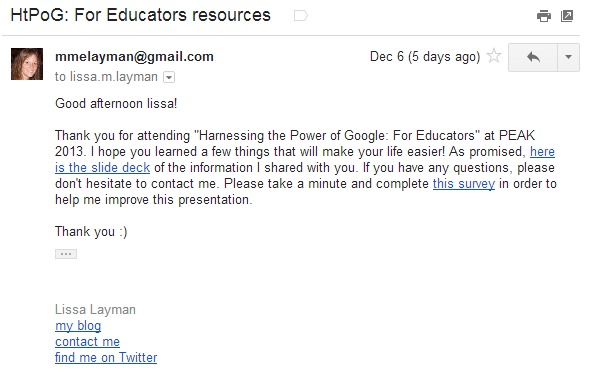
At the beginning (or end) of a PD session, I have teachers complete a short Google Form. Once they have submitted the form, they instantly receive an email from me.formMule auto email

I have to do a little work up front to set everything up, but it saves me enough time in the long run to make it completely worth it. The short video below is one I made for my Google Apps Certified Trainer application quickly showing how to set up the basic mail merge function.

Have you used formMule’s other functions? I’d love to hear about what else it can do!

Kuwait, Professional Development

Visual interpretation in the language B classroom

Yesterday I attended the MS/HS language B department meeting. We have both MYP & DP Language B offered in Arabic and French. One of their criterion is Visual Interpretation. The teachers wanted to learn about a few ways they could create posters (etc) for summative tasks for their students. After doing a little research, I decided to highlight 4 tools: PS Touch, Glogster, ThingLink and Tumblr. Below is the follow-up email I sent out this morning. I would love to hear about how you and your students create visual interpretation tasks & summatives in your MYP or DP language B classes! 

My reflection: First – why not use authentic realia for visual interpretation tasks? The power of language B is that it is alive and real in the world. Second – as a language B teacher and technology integration lover, my mind goes to what can my students create. The tools I presented can simply be used by staff to create tasks for the students but the real power comes when the tasks can be transformative.

  • Students create their own media (or find Creative Commons licensed media).
  • Pictures are edited using Photoshop (Instagram?) and videos could be uploaded to YouTube.
  • This media is then be used to create Glogs and/or ThingLinks.
  • The next step (towards redefinition) would be to compile the media into a Tumblr blog where students could document the journey of their visual, reflect on their visual and others’ and get input from the teacher, classmates and people around the world.

Good morning!

Thanks for letting me stop by your department meeting yesterday. I hope the tech tools you saw gave you a few ideas for visual interpretation in your classrooms. When I chose them I thought that they could be used by teachers or students to create visuals. These tools range from augmentation (PS Touch) to the possibility for redefinition (Tumbr). If you’ve found other tools, please don’t hesitate to share! Let me know if you have any questions. 🙂

Creative Commons Search – a great place to start to find media (photos, videos, audio, etc) that you are allowed to use (not copyrighted).

PS Touch (school iPad app)

  • No account needed.
  • Can create visuals with text from basic to advanced.
  • Tutorials built into app.
  • Students can email photo and/or print (or export to use in one of the options below).

Glogster (create & view on computer, view only on iPad)

  • You must create an account.
  • There is a free version that includes a 31-day premium trial.
  • Students should use Glogster.com to create accounts.
  • Great for students or teachers to create.
  • Choose your editable template. Add text, graphics, images, audio and video. Save & share the link. Can be printed.
  • CAN view on iPad (with free app) but cannot create.

ThingLink (also a free app)

  • You must create an account.
  • Great for students or teachers to create.
  • Can create and view on both computer & iPad.
  • Add an image. Then add ‘tags’ to insert text, photos, web links, music or videos. Share & save the link. Not ideal for printing.
  • Cool example

Tumblr (also a free app)

  • You must create an account.
  • You can have multiple ‘blogs’ per account.
  • Best for students to create on-going visuals throughout a unit.
  • Add text, photos, quotes, web links, chats, audio & video.
  • Students can share the link to their Tumblr blog with teachers. Not ideal for printing.
  • Has potential for redefinition (SAMR).
COETAIL, Collaboration, iOS, Professional Development

I watched #COETAILCast 11

And really enjoyed it! Definitely worth an hour of your time. But if you don’t have that much time, here are the highlights (according to me):

COETAILers on Twitter
After the workshop I gave at PEAK on Saturday, I found value in the conversation re: Twitter. Becoming a connected educator can do so much for you and for the education community.

COETAILers on Blogging 
A great discussion about making the time to blog and what to blog about. Hopefully something we can use during our KIEC workshops in January. Two highlights for me: “If you’re in a tech integration job, part of your job is to blog, to reflect” (Jeff Utecht) & “Write for yourself” (Chrissy).

Dana Watts on iPads in education
Dana summed up everything I believed in the perfect way. I’m not going to try to paraphrase. Just go watch it (only a minute or two).

Professional Development, UKSTL

What I’ve been up to lately: #UKSTL edition

I realized I haven’t really blogged much at all this semester. While there are a few reasons for that, one of them is that I’ve been putting a lot of time into my M.Ed. So here’s what I’ve been up to lately!

This semester I started my M.Ed in School Technology Leadership from the University of Kentucky. With 12 graduate credits and 7 weeks teaching MYP French (on top of my actual job), it has been one of the most challenging semesters of my career. However I cannot gush enough about how much I have valued everything I’m learning in the UKSTL program. I wanted a legit Masters program and I got one! Enormous amounts of reading, discussion boards, quizzes and homework, live classes with Adobe Connect (half of them in the middle of the night), learning APA, my first literature review…whew!

I took 2 classes for UKSTL: School Technology Leadership (EDL 661) with Jayson Richardson and Quantitative Methods (EDL 771) with John Nash. I’m officially done with 661 and have a few more assignments to finish this for 771 before I head to Sri Lanka for winter break :). Quantitative Methods has given me the vocabulary and skills I need in order to become a data-driven leader. School Technology Leadership has given me a basis for the things I believed about technology in education and really pushed me to research and define my ideas. If the rest of this program (I still have 4 semesters) is as fulfilling as this one has been – let’s go!

A few highlights:

  • I was introduced to the ISTE NETS-A for the first time.
  • Data has become much more important to me.
  • I read Open Leadership by Charlene Li (highly recommend!).
  • I wrote a School Technology Vision at the beginning of EDL 661.
  • I wrote my first literature review.
  • I interviewed a (pretty awesome) school technology leader.
  • I finished up 661 with my Post School Technology Vision….
    • …and a recruiting video.
Collaboration, Kuwait, Professional Development, Social Media

PEAK 2013 pt. 2 – Making the Web Work for You

After my first two sessions at PEAK last weekend, I gave a brand new workshop. As excited as I was about my Google Apps presentations, I might have been even more excited for “Making the Web Work for You.” I focused on becoming a connected educator and specifically on Twitter (I purposely left both of those terms out of the title because I didn’t want to scare anyone away). I’m realizing that besides meaningful technology integration, GAFE and being a connected educator are my passions. I love working with anyone, anywhere on these and don’t need anything in return.

I started by appealing to their feelings (educators never have enough time) and highlighting what they thought Twitter was. I then talked about what it actually is and gave them testimonials from the survey I created and other connected educators. I was heavily influenced by Steve Anderson‘s Twitter series but did have significant time constraints. I highlighted searching, hashtags and a few other must-knows. Then I gave them time to create accounts, explore some hashtags, find people to follow. A genius idea from Jeff – make sure everyone in the class follows everyone else before the session is over. I ended with ideas for organizing all this new info and next steps.

It was a great plan. And then I realized 20 minutes before the start of the session that Twitter was blocked at the school (!!!). Oh my goodness. I tried several different things but unfortunately I had forgotten my wireless router at home and we were in the basement (so my phone wasn’t working as a hot spot). But..it was okay. I let someone borrow my iPad and we just went with the flow. The workshop didn’t go exactly how I planned it but I still got great responses and people were excited about the possibilities of becoming connected. It was another example of how becoming a teacher has changed me – I’m flexible and don’t get easily rattled! 🙂

Google, Kuwait, Professional Development

PEAK 2013 pt. 1 – Harnessing the Power of Google

On Saturday I presented at the Professional Educators Around Kuwait Conference for the second year. I presented three workshops this year and the first two were repeats from last year: Harnessing the Power of Google For Educators & For Collaboration. One hour is a whirlwind for both of these sessions and I can’t wait to turn them into 4-hour workshops at KIEC in January!

Saturday reminded me how passionate I am about GAFE. I love helping teachers discover new ways to use Google Apps for themselves and in their classroom. I just submitted my Google Apps Certified Trainer application…can’t wait to find out in 4-6 weeks if I got it! 🙂

I learned from the responses last year and booked a computer lab for both presentations. I also updated the presentations slightly…enjoy! And as always, please don’t hesitate to contact me with questions. 🙂

COETAIL, Course 4

Problem-based learning = IB MYP design cycle?

Problem…or Project?
I recently mentioned the variety of X-based learning vocabulary that has invaded the education world. When I first saw PBL for this week’s blog I had to do a double take – I thought the P stood for ‘Project.’ So I needed to do a little research to understand the difference between Project and Problem -based learning.

In Project Based Learning (PBL), students go through an extended process of inquiry in response to a complex question, problem, or challenge. Rigorous projects help students learn key academic content and practice 21st Century Skills (such as collaboration, communication & critical thinking). (source)


In a problem-based learning (PBL) model, students engage complex, challenging problems and collaboratively work toward their resolution. PBL is about students connecting disciplinary knowledge to real-world problems—the motivation to solve a problem becomes the motivation to learn. (source)

Twitter and Google searches also helped aid my understanding between the two models. John Larmer contends that problem-based learning is a subset of project based learning and provides a helpful table to differentiate between the two. In Geoff Krall‘s opinion the two biggest differences are time and order and he also provides a great pie chat of the differences and similarities.

With a clearer picture of what these two models actually are I definitely see advantages to them. Just as I do with several of the other X-based learning models (game-based learning, challenge-based learning…).

IB MYP design cycle?
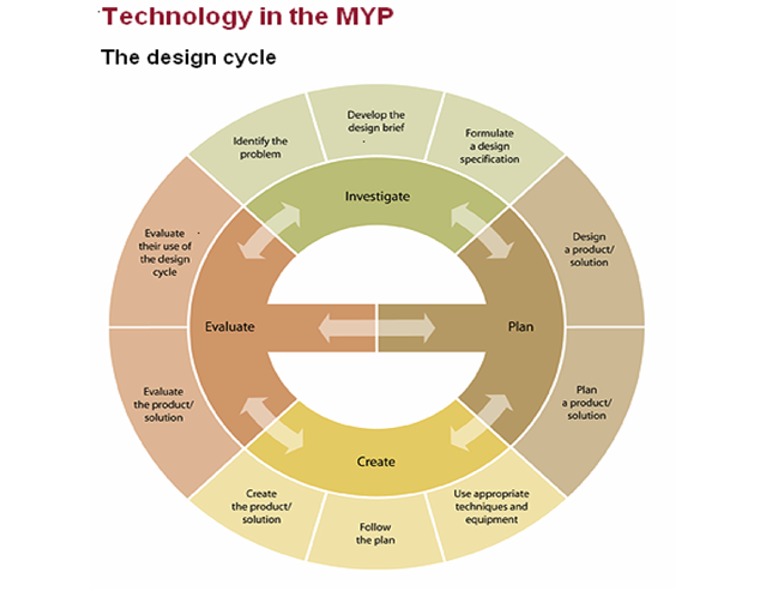
One of the features of problem-based learning is the ‘steps that can be repeated and recycled.’ The inclusion of authentic problems and the prescribed steps remind me of the IB MYP design cycle (and design thinking).
MYP Technology Design Cycle


The core of why I like the MYP design cycle, and all the X-based learning/thinking, is that they are student centered and move the teacher from the sage to a guide. What is best for my students is the question I always want to be reflecting back on. Are these models (or a hybrid or them) best for my students? Probably!

As for technology’s role this these models – it becomes a tool for learning, not the base of all learning. You could actually go through the entire design cycle without once using technology. Would it help facilitate the cycle? Most likely. But is is absolutely necessary? Not always. Design and X-based learning models have the potential (if done right) to give true meaning to technology integration.

Disclaimer: I don’t actually teach the MYP design cycle nor have I received official training. I’d love to hear opinions from any of you that do teach it / are trained!