1:1, Collaboration, iOS, Kuwait

Language B Final Exam Review

When I brainstormed with the Language B department (Arabic & French) about how they could meaningfully integrate technology (SAMR prof development), they were eager to talk about the (quickly approaching) end of the year. Reviewing with students can be frustrating for both students and teachers. They wanted a way to put the responsibility of the review on their students while also engaging them. Although we came up with several ideas, they were most intrigued by Popplet (some of them had already seen it) and two of our French teachers (MYP & DP) gave it a try.

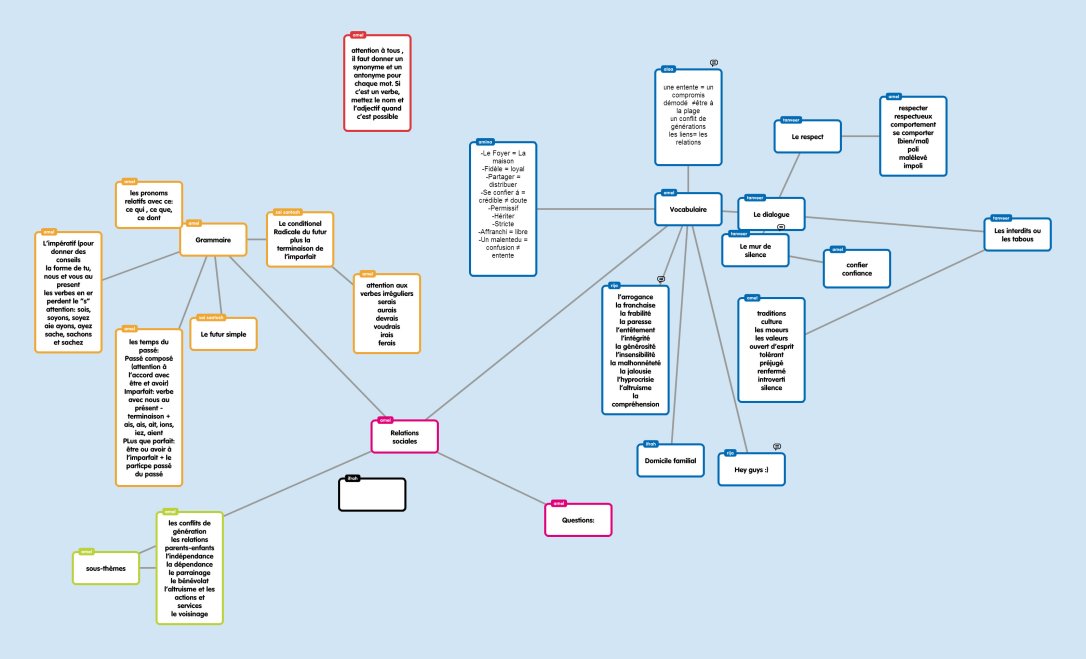
The teachers signed up for free Popplet accounts. For homework, the students signed up for accounts. Amel, the DP French teacher, created a popplet for each unit. She then created popples for grammar, vocabulary, and sub-topics. Once the structure was set, she invited students to the popplet. It was the students’ responsibility to fill in the popplet with grammer concepts, vocabulary words and sub-topics.
Tronc commun  Relations sociales

The middle school MYP teacher also used Popplet in a similar way with her students.
FRENCH REVIEW GRADE7

It was fun to hear the oohs and aahs from the students when I added a popple from the desktop and it showed up on their screens. The teachers liked that their students could collaborate and that each popple automatically included the creator’s name. Although only the creator can edit a popple, the teachers liked the comment function to help guide students. The ease of adding students to popplets was beneficial for the teachers. The ability to share links to popplets (on their class Edmodo pages) and create images was incredibly useful. The biggest negative? We’re an iPad school – the fully functional free website is flash-based and the app (with ability to collaborate) costs money. Also, you can only create a limited number of popplets (easily solved by saving the image when done and deleting the popplet).

Although this isn’t a “redefined” use of technology, the ability to simultaneously collaborate on a brainstorm with students gives it more oomph than “substitution.” It was a little taster for our teachers and hopefully they’ll be able to build on their experiences next year.

Collaboration, Kuwait, Professional Development

K-12 SAMR PD Phase 2.0

It’s been awhile since we actually did phase 2.0 but I’ve been bad at blogging. I do want to make sure I get some thoughts down before I completely forget!

In Phase 1 we went into Divisional meetings. Phase 1.5 was done with only the Middle School teachers. For Phase 2.0 we attended Department (HS/MS) and Grade Level (ES) meetings. I attended the Language B, Science and Language A Arabic Department meetings. To date we have been invited into KG1 and Grade 3 meetings (only 5 to go…maybe).

Way back in Phase 1 of the SAMR series, we left teachers with the question “How have you used technology in your classroom as a direct tool SUBSTITUTE?” We wanted to make sure that we followed-up and didn’t leave teachers hanging so this was our first order of business. My priority was to give teachers a comfortable space to share what they have been doing. I think it is incredibly important that teachers are able to share with each other (without feeling judged) in order to foster discussion and ideas.

I then asked teachers to share a lesson (that they recently taught or will be teaching in the near future) that didn’t originally include technology but that they would like to brainstorm ways to transform. As a group we brainstormed ways that technology might be used, focusing on the great lesson plan and THEN the technology. I then briefly shared our Tech Coaches website with them. I included Jeff Utecht‘s SAMR Circle and my adapted Thinking Critically flow-chart. I didn’t go into detail about either but hope that we will be able to next year.

One of the challenges in the meetings was keeping everyone focused on the things we CAN control. Understandably teachers enjoy having a place to vent. Nonetheless it was great to get the conversation going and some great ideas were thought up. Below are excerpts from the emails I sent out after each meeting (my goal is to always follow-up!).

Collaboration, Kuwait, Social Media

International Mindedness & Twitter

Thank you to everyone who helped me last week by answering my questions about Technology Coaches. My PLN is awesome!

Our school is starting voluntary focus groups based on where we feel we need to improve in our Middle Years Program practice. Because of my passion for culture, I chose to participate in the ‘International Mindedness‘ group.

Our initial meeting was just me and Deb, our MYP coordinator. We skimmed some literature from the IBO and then discussed what international mindedness might look like in our school. Our short-term goal is to help teachers incorporate/recognize the three dimensions of global consciousness (global sensitivity, global understanding and global self) in their unit plans.

As we were brainstorming, we discussed that maybe it was easier than one might think. In Earth science, instead of just teaching about sand and water (because that’s what we have in Kuwait) teachers should also be teaching about soil, ice, etc. The technology coach in me couldn’t help but connect international mindedness to global collaboration through the use of technology. Social media baby! Students are no longer confined to studying what they can see in their environment or what a book tells them.

Dinner is served

Kuwait is rife with pollution and we tend to focus on how bad it is here. During a unit of study, students could create a hashtag and share pictures of pollution in Kuwait on Twitter. With careful hashtag selection, these tweets could be seen by other students around the world. The goal would be to get students from all over to share pictures of pollution in their countries. I could see this idea getting changed around (for the better) by students. I’d love to see what could come of something like this across different content areas in our school when students took ownership of it. Students are on their phones constantly…let’s allow them to be open-minded communicators!

COETAIL, Collaboration, Kuwait, Professional Development, Social Media

#NESA_SEC 2013

To be honest, I attended the NESA Spring Educators Conference this year because my husband was chosen to present. Instead of wondering around Bangkok by myself for 3 days, I decided to pay (a lot) to attend the conference in the hopes of mediocre professional development. What I got was much more than that!

Networking: I had the opportunity to meet Dana Watts and Scott McLeod in person (and attend their sessions). I’ve been following them on Twitter for awhile and have a bit of a blog-crush on Scott’s Dangerously Irrelevant. I also found many new international educators to follow – my list is still primarily US-education based and I’m ready to expand my PLN! The discussions that took place on Twitter were equally as valuable as the sessions I attended.

Sessions: I really enjoyed the idea of the 4-hour workshops. Scott McLeod’s workshop blew my mind (as did the keynote). I was inspired & challenged by the content Scott delivered and by the collaboration that I participated in and witnessed. Check out the unit/lesson plan my group made (we had approx 25 minutes to create it). We then presented the lesson to another group who gave us feedback (and vice versa). I was completely overwhelmed at first (and didn’t like the constraints  but then it got me thinking -if we could do this in 25 minutes, what could teachers who actually teach this content do in an hour (or more!)? And I ended up really liking the fact that Scott had given us constraints – it focused us and was much closer to reality (we all have standards…). If I had gone to nothing else, these two sessions would have made the entire conference worth it.

Decisions: Scott & Jayson handed out fliers for the School Technology Leadership programs at the University of Kentucky during the workshop. My first instinct was to set it aside without really looking at it. The longer I sat in Scott’s workshop the more I felt that piece of paper calling to me. I listened to Scott and Jayson talk about the program and did a little of my own research. Wow. Even though I’ve already started my Masters with COETAIL, I felt pulled to the UKSTL Masters. Scott, Jayson and Dana were nice enough to answer a few questions for me…and my mind was made. I’ve been (quickly) assembling my application ever since (due May 1). I’m really excited about the possibility of being a part of the next UKSTL Masters cohort (I’ll still complete the COETAIL certificate, but won’t do the Masters). The more I sit on my decision to apply the stronger the pull becomes to be a part of ‘it.’

So…the Spring Educators Conference was a success. I am bummed that I missed out on the opportunity to meet Doug Johnson and attend his sessions. Next year the conference doesn’t back up to Spring Break…but if there’s a good line-up of presenters I might just pony-up the cash and go again. 🙂

Collaboration, Kuwait, Professional Development

K-12 SAMR PD – Phase 1.5

After introducing SAMR to our entire PreK-12 staff, we were granted a little extra time with the middle school teachers. Here’s how it went down:

1. Compile a list of how teachers answer the question “How are you using technology in your classroom as a direct tool substitute?” in a Google Doc to be shared with the entire middle school staff.

2. Allow teachers time to brainstorm tasks that they ask students to do.

3. Share out, creating a Popplet.

4. Brainstorm technology tools that teachers could use to accomplish their tasks (stress task first, tool selection second), adding to Popplet.

After the meetings, we finalized the Google Doc and all 4 Popplets. We also added more tools that we thought would best fit the tasks (quality over quantity). We sent the links to all the documents to the MS staff reminding them that the Popplet compilations are a work in progress and a toolbox for them to start using.

Do you have tools to add?
Grade 6
Grade 7
Grade 8 (there was a different thought process for this one)
Specialists

Lots of thanks and props to my wonderful co-worker (and husband) for helping brainstorm and give this PD! The popplet suggestion was genius! Thanks Jeff 😉

COETAIL, Collaboration, Professional Development

#Coetail Course 1 is done!

I can’t believe it’s already done! It went by so fast 🙂 I’ve already been able to meet fellow COETAIL-ers in person and love that my PLN is expanding exponentially. Although I’ve been “connected” for about 2 years, my PLN consisted of mostly American educators. COETAIL has given me the opportunity to connect with international educators around the globe and we’ve just begun!

Feel free to browse my Course 1 posts/reflections including my final project 🙂 (Bug all fixed thanks to Jeff Utecht!)

Collaboration, Google, Kuwait, Professional Development

UAE #GAFESUMMIT 2013

Jeff and I headed to Dubai for the first time last week to attend and present at the Middle East GAFE Summit. It was everything we hoped it would be…and more (I know, so cliché but so true!).

Both of our presentations were on Thursday. In the days leading up to the Summit, I reached out to my PLN to help show the power of global collaboration. Everything went extremely well and I’m incredibly grateful to everyone who attended my session and collaborated on the document with us (feel free to keep adding to it)! I’ve embedded my presentation slide deck below. You can also check out my website for Conjugating Google Docs in the World Language Classroom.

The last session of the Summit was a demo slam. I’ve seen demo slams before but never participated. I found the courage inside (maybe the biggest group  of people I’ve ever presented to) and did a slam of Google Story Builder. I asked the crowd to help me create a story and we had fun story written and ready to share in under 3 minutes! If you use this in your classroom, I’d love to see how! The slam was a competition but I wasn’t in it to win it…just wanted to have the experience and do some sharing! The other presenters were a great group and we had fun slamming!

We met a lot of new people – it was extremely refreshing to be in Dubai and hang out with like-minded educators. We also attended several quality sessions. If you weren’t able to make the summit, all the session resources are online and Jeff Genest was kind enough to set up a Google Spreadsheet to collect all the #GAFESUMMIT tweets! The next summit is in Virginia next weekend so be sure to check out the resources and hashtag for more fun stuff.

1:1, Collaboration, iOS, Kuwait

A Reflection on Tech Integration – Grade 1

A couple weeks ago a 1st grade teacher emailed us wanting to discuss how she could use the iPad in her lessons. I was the only tech coach available so I invited her up to the office. When I asked her about her objectives, she explained that she wanted the students to create word-webs to brainstorm for a story and then write their stories (individually). She wanted to give those with the iPads the option of using the iPad to brainstorm and create their stories. The two apps on our iPads that might be simple enough for 1st graders to create stories are Explain Everything and Keynote. We decided that my first session with the students would be to “teach” them how to use Explain Everything through the creation of their word-webs. I would then go back into the classroom a second time to help them create their stories.
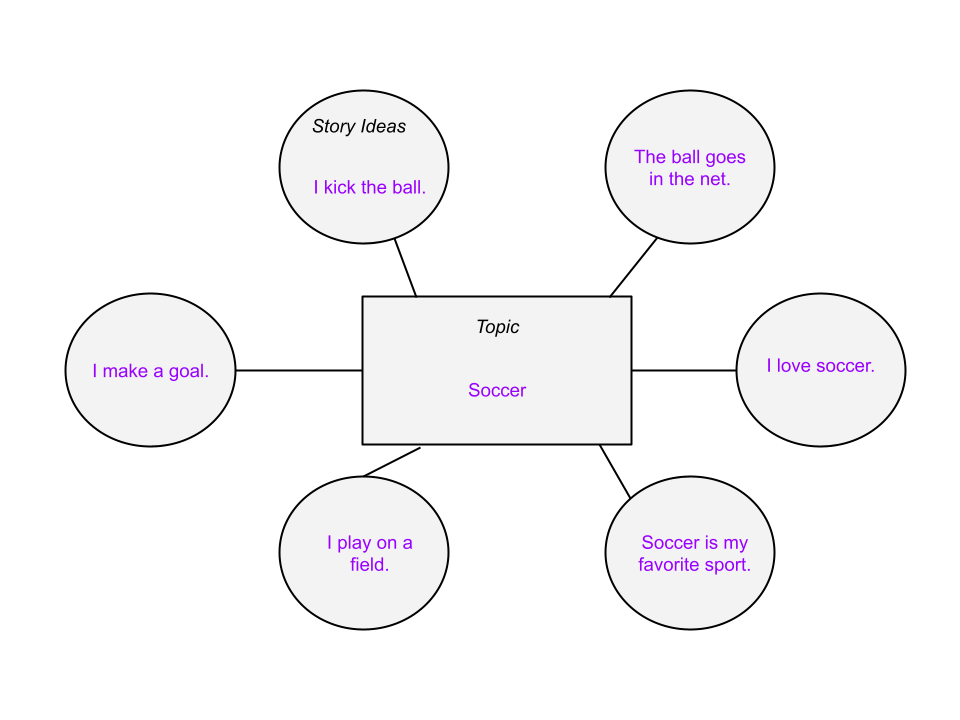
Session 1 Reflection:
Jeff came with me to help teach the 10 students with iPads how to use Explain Everything. While we were with the iPad students, the teacher was in another part of the classroom with the rest of the students. Students without iPads were given a paper template to create their mind-maps. Students using Explain Everything had to create their own shapes before starting their brainstorm. It didn’t go quite as smoothly as one would have hoped.

After class, Jeff and I discussed how we could have done it differently. We knew we couldn’t just teach 1st grade students how to use Explain Everything through direct instruction. BUT the students were quite distracted by the technology. Many of them created great brainstorms, others never got past the stage of drawing their shapes. Looking back on it I would have changed several things:
*all students start with the classroom teacher to talk about brainstorming and create a class mind-map.
*all students make their first draft of their mind-map on paper using the teacher-created template.
*students with iPads then re-create their mind-maps using Explain Everything (with assistance from tech coaches).

Does this process take longer than without using technology? Yes. Is using technology making their stories better in the end? Maybe. That’s a big maybe and depends a lot on how the students use Explain Everything. When I was in the classroom my lesson plans involving students using technology usually took longer so students could become comfortable with the technology (device, app, etc). But the ultimate goal was to save time in the long-run and end with a better product and a deeper understanding of the concept. In revising this 1st grade lesson, students would be repeating the process of creating their mind-map (once on paper, once in the iPad). Maybe students would revise their paper draft when creating the iPad draft, allowing them to think of better ideas. The major purpose of the second draft would be getting them comfortable with Explain Everything so that they could then use the app to create their stories.

Session 2 Reflection:
Jeff and I went back into the classroom today to continue helping the students use their iPads to create stories. We thought we would mostly be helping them transfer their ideas into stories however the majority of the hour that we were there was a continuation of creating their word-webs. Once again students were distracted by the technology. By the end of the hour, most of the students with iPads had moved on to turning their ideas into stories. We weren’t exactly sure what the stories were supposed to look like, so we had students add slides to their Explain Everything word-web and write 1 sentence per slide.

After leaving the classroom Jeff and I began immediately debriefing and reflecting on the project and instruction. Did the technology cause the students to create better projects? No. The projects were of equal quality, if not worse, to what the students using paper created. Does this project still have potential to create something better? Maybe. After the students have finished their stories (with 1 sentence per slide), they could use the record feature of Explain Everything to make a product that the other students would not be able to make. Students would then have original stories (writing), with their own narration (reading) and the videos would be able to be shared with other students and parents. Is this possible in a 1st grade classroom? Maybe…with lots of practice and patience!

As technology coaches we need to make sure that we are always encouraging our teachers to use technology when appropriate. It is a TOOL that should be used when it is the BEST tool for the job. If paper and pencil are the best tools for the project…that’s okay! There is a fine line between quality technology integration and superfluous technology integration.

1:1, Collaboration, iOS, Kuwait, Professional Development

Getting back in the swing of things!

Wow it’s been a long time since I posted anything! 2013 had a great start – we were home in MI for Christmas & the New Year and my sister, Abby, came back to Kuwait with us! She is substitute teaching for the semester and just signed a contract to come back next year to teach Pre-K. We’re pretty excited to have a little bit of home here 🙂

One of our biggest challenges as technology coaches this year has been getting teachers on board and actively incorporating technology in their classrooms. There have been a lot of ups and downs with our 1:1 iPad initiative and I don’t think teachers really know what to think – should they invest their time or is it all going to be for naught? Students currently have to pay a fee to acquire a school iPad and gain access to the wireless network. We’re not exactly sure on the numbers but somewhere around 40% of our student body (~2000 students PreK-12) have iPads. This presents many obvious logistical problems for classroom teachers.

As a tech coaches, we’re trying to decide where to focus this semester  Last semester we offered Professional Development after school on Mondays. Although our turnout was good at first, the numbers slowly diminished. We set up a website, but we’re not really sure if our staff actually uses it. Plus we’re still trying to figure out the dynamics of working in a 3-person team.

For the most part our job this semester has become more individualized. The principals sent out an email for us and we’ve appeared at a couple meetings, but we’re trying the let-them-come-to-us method. We don’t want to offer PD that teachers don’t want or won’t come to. But we DO want to support our staff. We’ve been encouraging teachers to give students choice for assignments and allow them to use the iPads. Teachers (individually and in small groups) have started coming to us more to help them plan units & lessons, create their class websites or blogs and support them in the classroom during lessons.

Whenever I get frustrated or down I just try to remember that this is a growing year. I wasn’t involved in the process until we arrived in August (and I’m not always consulted now) so we all just have to work with what we’ve been given. We have some students with iPads which isn’t the ideal 1:1 ratio however it’s much better than most other schools in Kuwait (who don’t even have wi-fi). I’m looking forward to seeing how everything turns out in the next couple years 🙂

Reflector Update:
We’re still in the testing phase of this project. The 5 elementary teachers that are using the app aren’t having great success. We know that it’s not our network or the app itself (I have success using the app on my 2012 laptop connected to the school wireless) or the wireless adapters (we bought & installed 2 new ones with no success). We now think that it might have something to do with the computers that teachers are using (low RAM, etc). We’ll be continuing to investigate during the next couple months!

Some fun events coming up this Spring:
*Jeff and I will be starting our masters with COETAIL on February 4th
*Abby, Jeff and I will be traveling to Greece at the end of February for a long weekend (National Liberation)
*My brother and his girlfriend are coming to visit us in March for their Spring Break
*The three of us will also be traveling to Thailand and attending NESA in April (Jeff is presenting!)

If you’d like to read more about our lives outside of school, feel free to check out our other blog. 🙂

Collaboration, Google, Kuwait, Professional Development

Presentation x2 from #Peak2012

Last weekend I attended and presented at the Professional Educators Around Kuwait conference (PEAK). Calls for presentation proposals went out last month and I had a difficult time deciding what to present about. My husband suggested I choose something I was passionate about…so Google Apps it was (duh!). A colleague helped me refine my ideas and off I went!

I had no idea what to expect from this conference. Honestly, I didn’t expect a whole lot. The rooms did not have projectors or internet (I brought my own). There was no keynote, simply 4 sessions with lunch and a raffle afterwards. When I got the HUGE document with the descriptions of the sessions I didn’t think there was any way that there would be enough people present to attend them all. Turns out there were close to 1500 educators from over 30 schools! After my 2 presentations, I attended a session on ‘Arabish‘ and a second session on strategies for teaching students are are English Language Learners. Both were decent but learning about Arabish was incredibly interesting, especially after taking an intro Arabic course this semester. The buffet lunch was fantastic and I even won a tea set at the raffle 🙂

My first session was ‘Harnessing the Power of Google Apps: For Educators.’ I focused on using Google Apps in order to make educators’ lives easier and save them time (Google Apps basics).

My second session was ‘Harnessing the Power of Google Apps: For Collaboration.’ This session assumed that you attended my first session or had a basic understanding of how to use Google Apps. I focused on effectively using Google Apps in order to facilitate and encourage collaboration among teachers and students.

I think these sessions could be combined into a 3-hour workshop where all participants had devices (preferably laptops or Chromebooks). The biggest false assumption that I made was thinking that teachers would bring devices to an education conference and, specifically, to a session on Google Apps. I learned that this was not the case in Kuwait. Many participants had devices, but mobile devices (including iPads) are not optimized for using Google Apps effectively.

My sessions have been submitted to NESA for consideration to be included in the Spring Conference in Bangkok. Our plan is to go to Thailand for Spring Break either way…so it’s a win-win!  I would love any feedback about these presentations for the future 🙂