1:1

Looking for input from all of YOU!

This has been a really interesting year as a Technology Coach in our school. It’s the first year the school has had a position like this. There are 3 of us in the position (2 a married couple, 1 not a certified teacher). We don’t have a job description. The school is attempting to go 1:1 with iPads…I could go on.

After working with some teachers and approaching in it different ways, things have come to a point where we need to figure some stuff out. That’s where I’d be forever grateful if you’d chime in! In any way you’d like (comment, tweet, email, etc), could you please respond to any or all of these questions? This is a rather hastily written plea so anything else you’d like to contribute would be wonderful. MERCI bien in advance!

Do you have technology coaches (instructional technology specialists, technology integration coaches…whatever you’d like to call it) in your school? (Why?)

What does their job look like? What responsibilities do they have? (Why?)

Are they certified teachers or support staff? (Why?)

Are they considered admin/leaders or teachers? (Why?)

Do they influence teachers or give them what they ask for? (Why?)

Please share any knowledge or resources you have! I’m eager to help mold this position into what is best for the teachers and school. THANK YOU!


Professional Development

Looking for input from all of YOU!

This has been a really interesting year as a Technology Coach in our school. It’s the first year the school has had a position like this. There are 3 of us in the position (2 a married couple, 1 not a certified teacher). We don’t have a job description. The school is attempting to go 1:1 with iPads…I could go on.

After working with some teachers and approaching in it different ways, things have come to a point where we need to figure some stuff out. That’s where I’d be forever grateful if you’d chime in! In any way you’d like (comment, tweet, email, etc), could you please respond to any or all of these questions? This is a rather hastily written plea so anything else you’d like to contribute would be wonderful. MERCI bien in advance!

Do you have technology coaches (instructional technology specialists, technology integration coaches…whatever you’d like to call it) in your school? (Why?)

What does their job look like? What responsibilities do they have? (Why?)

Are they certified teachers or support staff? (Why?)

Are they considered admin/leaders or teachers? (Why?)

Do they influence teachers or give them what they ask for? (Why?)

Please share any knowledge or resources you have! I’m eager to help mold this position into what is best for the teachers and school. THANK YOU!

COETAIL, Collaboration, Kuwait, Professional Development, Social Media

#NESA_SEC 2013

To be honest, I attended the NESA Spring Educators Conference this year because my husband was chosen to present. Instead of wondering around Bangkok by myself for 3 days, I decided to pay (a lot) to attend the conference in the hopes of mediocre professional development. What I got was much more than that!

Networking: I had the opportunity to meet Dana Watts and Scott McLeod in person (and attend their sessions). I’ve been following them on Twitter for awhile and have a bit of a blog-crush on Scott’s Dangerously Irrelevant. I also found many new international educators to follow – my list is still primarily US-education based and I’m ready to expand my PLN! The discussions that took place on Twitter were equally as valuable as the sessions I attended.

Sessions: I really enjoyed the idea of the 4-hour workshops. Scott McLeod’s workshop blew my mind (as did the keynote). I was inspired & challenged by the content Scott delivered and by the collaboration that I participated in and witnessed. Check out the unit/lesson plan my group made (we had approx 25 minutes to create it). We then presented the lesson to another group who gave us feedback (and vice versa). I was completely overwhelmed at first (and didn’t like the constraints  but then it got me thinking -if we could do this in 25 minutes, what could teachers who actually teach this content do in an hour (or more!)? And I ended up really liking the fact that Scott had given us constraints – it focused us and was much closer to reality (we all have standards…). If I had gone to nothing else, these two sessions would have made the entire conference worth it.

Decisions: Scott & Jayson handed out fliers for the School Technology Leadership programs at the University of Kentucky during the workshop. My first instinct was to set it aside without really looking at it. The longer I sat in Scott’s workshop the more I felt that piece of paper calling to me. I listened to Scott and Jayson talk about the program and did a little of my own research. Wow. Even though I’ve already started my Masters with COETAIL, I felt pulled to the UKSTL Masters. Scott, Jayson and Dana were nice enough to answer a few questions for me…and my mind was made. I’ve been (quickly) assembling my application ever since (due May 1). I’m really excited about the possibility of being a part of the next UKSTL Masters cohort (I’ll still complete the COETAIL certificate, but won’t do the Masters). The more I sit on my decision to apply the stronger the pull becomes to be a part of ‘it.’

So…the Spring Educators Conference was a success. I am bummed that I missed out on the opportunity to meet Doug Johnson and attend his sessions. Next year the conference doesn’t back up to Spring Break…but if there’s a good line-up of presenters I might just pony-up the cash and go again. 🙂

COETAIL, Course 2

Breaking the law is easy

While at the NESA Spring Educators Conference in Bangkok 2 weeks ago I heard about the University of Kentucky School Technology Leadership Masters. The more I talked to Scott McLeod, Dana Watts and Jayson Richardson about the program, the more I knew it was something I needed to do. Since then I’ve been reading my Google Reader through leadership-tinted glasses. After writing my post a couple days ago about digital footprints in education, I had another thought today. My post focused on how administrators judge potential hires based on their online activity…but what about vice versa? There are several connected administrators that I would love to work for (Eric Sheninger, George Couros, Chris Lehmann, & Steven Anderson to name a few). When I’m job-searching & interviewing in several years I will be looking at THEIR digital footprints…the superintendents, the principals, the school, etc. Connected teachers need to turn the tables and actively pursue jobs that we want with admin we want to work for!

On to some copyright laws…
Easy on the I's (eyes)
Forgetting about copyright is just too easy. It’s no wonder that laws are broken on a daily basis – other people’s work is constantly at the tip of our fingertips. It’s senseless and relatively guilt-free (read: anonymous). It takes a lot of effort to find Creative Commons images instead of just Google searching and using the first one you like. So how do we teach this idea to kids? I think it’s a difficult concept to teach in the US, let alone in the rest of the world.

As far as I know there are few (copyright) laws in Kuwait. We have DVD guys that sell ‘pirated’ copies of TV shows & movies, stores that will jailbreak your iPad…and so much more (…was I supposed to say that?!). As we roll out our 1:1 program with iPads, I consistently witness students breaking copyright “laws.” Usually it has to do with music and/or images. It’s just too dang easy to save pictures and rip audio/video. Kids don’t even think twice about using other people’s work and most definitely don’t consider it plagiarism. So I guess that’s my solution – get them thinking. Ask them how they would feel if someone else stole their work (and didn’t give them credit). Help them understand Copyright and Creative Commons and the difference between the two. [I really like Doug Johnson‘s idea to change the focus to what is permitted, not forbidden.] Encourage students to share their work using Creative Commons licenses. Know the answers to their questions. Encourage students to create their own material (music, photos, images, etc). If students absolutely must use other people’s music & images, make sure that they have the right tools to find content and cite it. Integrate digital citizenship into your curriculum. Be role models (this might just be the hardest one).

COETAIL, Course 2

Personal and Professional Collide Online

Surfers almost collide at Morro Rock, Morro Bay, CA

I have to disagree with hiring and firing based on profile photographs. Shouldn’t your personal life be left at the door? A person working five days a week deserves a little down time on the weekends. What a person does on his or her own time on days off should not be used to judge work ethic because that person may be serious and hard-working when they enter the workplace. Employers know that Facebook is popular and that our generation is utilizing it, but business and personal lives should not coincide. ~Samantha MacConnell, Don’t overestimate privacy of online information

Samantha has a great idea. And in an ideal world personal and professional lives wouldn’t intersect. However that’s not the world we live in. Everything we do online affects our lives. ESPECIALLY as educators.

I attempt to keep my personal and professional lives separate by using privacy controls and choosing how I use social media. My Facebook is personal – I have high privacy settings, stay up to date on any privacy changes and don’t talk (much) about my professional life. My Twitter is professional – I have it completely open to leave a positive digital footprint and rarely talk about my personal life.

I currently have 3 blogs – two professional and one personal. All three blogs are completely open and searchable on the web. Living in Kuwait, we are very careful about what we put on our travel blog. Anything questionable either goes on Facebook (high privacy!) or doesn’t get posted.

All that said…if a student or employer manages to find me on Facebook, I’m not worried. I don’t live my life in a way that would get me fired. And if I did, I would understand that there could be consequences for making my actions “public.” Although I value privacy and attempt to have a certain amount of it, I know there really isn’t any such thing on the internet.

[I love Google products…but I didn’t even attempt to go there re: privacy.]


COETAIL, Course 2

The Digital-Education Disconnect

Rural Disconnect

As an advisory teacher for a group of seniors last year, we spent one 20 minute lesson talking about their “digital footprint” (I’m not even sure we used that phrase). I barely remember the lesson so I’m sure my students remember it even less (I wish I would have known about this lesson!). Adults love to TALK about how what kids do online now will impact their future, but do we walk the walk? How many adults in education are actively concerned about their digital footprint? How many of us know that what we do online can hurt (AND help) our chances of getting jobs? Yes – I believe that as (international) educators we should have a digital footprint that helps demonstrate what we can bring to an organization.

A theme often talked about among connected educators on Twitter & #edchat is how to get more educators involved in the conversation. In a US system where many teachers stay in the same position/district for their entire careers, will they ever see the benefit of a positive digital footprint? Teachers who never change jobs would rarely think about if their employers are looking for a positive footprint. International teachers are in a different boat. From my (limited) experience, it seems that we change jobs much more often – some people as often as every 2 years. Our digital footprints may be closer to the forefront of our minds however I think it’s still quite common to focus on the negative effects of social media and not how it can actually help us grow in our practice. That said, how many people know the ins and outs of their privacy settings on Facebook, Twitter, etc?

And then there’s the administration. How many administrators that are actively hiring are looking at applicants’ digital footprints (positive or negative)? What do admin actually KNOW about the people they hire (besides what’s on their beefed up resumes and what their references say)? A simple google search provides a plethora of professional evidence. I wonder if any of my administrators during the last 4 years have bothered to see what I’ve put online.

A couple months ago I watched the beginning of a keynote by George Couros during Calgary Educational Partnership Foundation‘s Online Safety Week. He talked to the students about how everything they do online (even during grade school) will affect their job prospects later. Ironically students had already been tweeting (using the hashtag) about how they didn’t want to be there and other not so nice things. Little did they know George was online watching them!

Kids don’t understand the gravity of their actions online (specifically social media) nor how to harness their power for good. But who’s teaching them? There aren’t many adults out there with the skills to do so. This mix will lead to a very interesting future for all of us!

Collaboration, Kuwait, Professional Development

K-12 SAMR PD – Phase 1.5

After introducing SAMR to our entire PreK-12 staff, we were granted a little extra time with the middle school teachers. Here’s how it went down:

1. Compile a list of how teachers answer the question “How are you using technology in your classroom as a direct tool substitute?” in a Google Doc to be shared with the entire middle school staff.

2. Allow teachers time to brainstorm tasks that they ask students to do.

3. Share out, creating a Popplet.

4. Brainstorm technology tools that teachers could use to accomplish their tasks (stress task first, tool selection second), adding to Popplet.

After the meetings, we finalized the Google Doc and all 4 Popplets. We also added more tools that we thought would best fit the tasks (quality over quantity). We sent the links to all the documents to the MS staff reminding them that the Popplet compilations are a work in progress and a toolbox for them to start using.

Do you have tools to add?
Grade 6
Grade 7
Grade 8 (there was a different thought process for this one)
Specialists

Lots of thanks and props to my wonderful co-worker (and husband) for helping brainstorm and give this PD! The popplet suggestion was genius! Thanks Jeff 😉

Kuwait, Professional Development

SAMR in Arabic

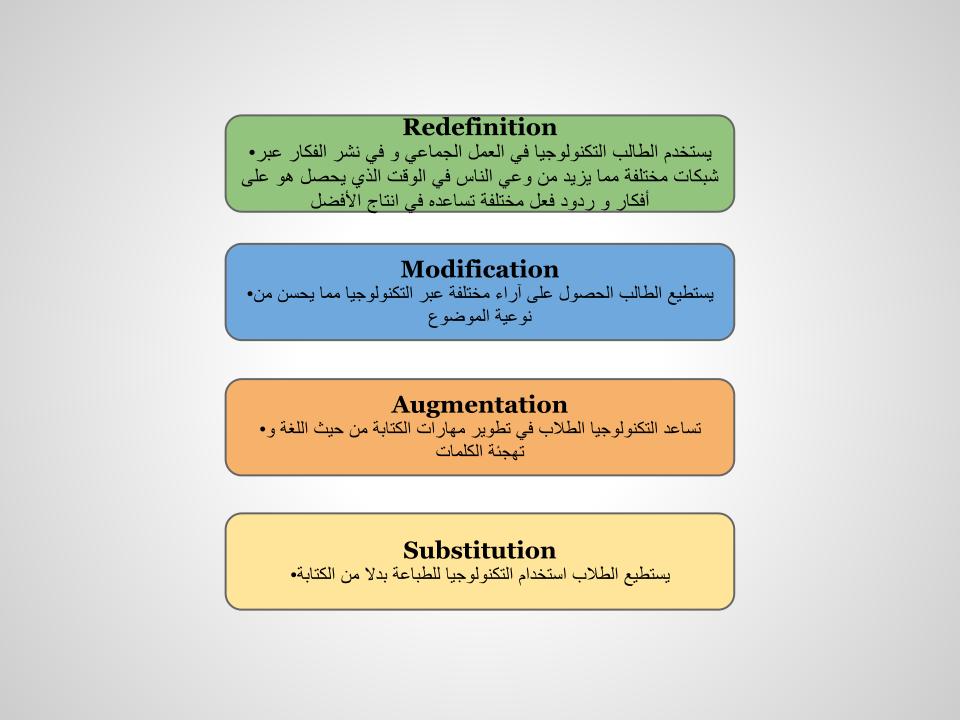
You may have noticed that one of the slides in my last post was a little funny looking. We have many teachers at our school in Kuwait who are native Arabic speakers and are at varying levels of English proficiency. We did quite a bit of searching and asking around but we weren’t able to find any resources to introduce SAMR to our Arabic staff. One of our wonderful HS Arabic as a Foreign Language teachers was amazing enough to sit down with me and work on a translation of SAMR. This translation keeps the English words for Substitution, Augmentation, Modification and Redefinition (to keep the acronym consistent). In addition, it is not a direct translation but gives an idea of the meaning behind S, A, M & R.

Feel free to use our translation as needed (with attribution of course). 🙂

SAMR - Arabic

Kuwait, Professional Development

K-12 SAMR PD – Phase 1

SAMR is something I’ve wanted to introduce to our staff for awhile…we were just waiting for the right time. We’ve had some setbacks with our 1:1 iPad initiative this year and I’m ready to step away from the device towards quality pedogogy and technology (not iPad) integration. After blogging about the proposed PD plan for COETAIL course 1, we’ve finally been able to put a few pieces into action here! It’s initiated some great discussions thus far and I’m looking forward to continuing with the SAMR mindset (we’re avoiding the terms framework and model) as we bring in new staff in August.

We went into the Elementary and High School divisional meetings and the Middle School grade level meetings. [Side note: One thing we’re quickly realizing is how different the vibe is between divisions. I’ve only ever taught in a high school so I’m used to the (sometimes) close-minded and bitter vibe (NOT saying that all HS teachers are this way!). Elementary teachers (while still a little bitter) are much more open to doing activities and having discussion.] Prior to the ES & MS meetings, the principals asked staff to read an article from the NASSP that we provided. Here is how each meeting was run:

1. Give teachers a couple minutes to talk about anything/everything they know about SAMR and do a little research on what it is (they had their iPads). We gave groups butcher paper in case they wanted to write anything.
2. Give them a little help (links to specific SAMR websites/articles).
3. Share out to the group about what they knew/found. Show them the SAMR visual.
4. Provide them unmarked examples of S, A, M & R (in paper & electronic formats). Allow them to discuss & debate in order to match the examples to ‘phases.’
5. Go over together which example matches S, A, M or R and ask teachers WHY.
6. Leave teachers with a question to ponder (to be followed up): “How have you used technology in your classroom as a direct tool substitute?”

We stressed that teachers are already doing these things and that we are just giving them common vocabulary to use. We are also avoiding the hierarchy mentality ..that’s not what SAMR is! After each meeting, we sent an email to all teachers with the resources used and a reminder of the question. See our slides (with examples linked) below. (They are very similar, only the examples are different.)

Elementary

Middle

High

COETAIL, Collaboration, Professional Development

#Coetail Course 1 is done!

I can’t believe it’s already done! It went by so fast 🙂 I’ve already been able to meet fellow COETAIL-ers in person and love that my PLN is expanding exponentially. Although I’ve been “connected” for about 2 years, my PLN consisted of mostly American educators. COETAIL has given me the opportunity to connect with international educators around the globe and we’ve just begun!

Feel free to browse my Course 1 posts/reflections including my final project 🙂 (Bug all fixed thanks to Jeff Utecht!)