1:1, Kuwait

Medieval Medley – a MYP Humanities Summative

In April, our two 8th grade MYP Humanities teachers approached us to collaborate on their upcoming summative. Students were able to pick a person, place or event, do research and then present their information to the class in a variety of ways. The teachers had already given students options for steps 1 to 3s. It took many meetings to come to a mutual understanding of what they wanted from us and how technology integration might look throughout the process. My biggest concern was that we keep the summative as inquiry based as possible (following what they had already created). I wasn’t a big fan of giving them a list of technology options with examples for each – I wanted students to be creative, not me. We ended up coming up with a variety of ways that students could use technology to create presentations from step 3. When I was contemplating the list, I made sure to start with the task (step 3) and then create a list of technology options.

Each tech coach took a couple class sections and attended three of their work sessions (after their research was complete). During the first session, we introduced a couple of the technology options.My goal was to focus on technology tools that they probably hadn’t seen or used before and talk about the task.

For the next 3 class periods, I circulated the room asking students how they had chosen to present (step 3) and giving advice/tech help where needed. Although there were still many students who simply used a PowerPoint or Keynote to give a lecture, there were a few who had some really great products. My favorite non-tech project was a medical time capsule. The student went all out and was completely committed to his project: he introduced it by saying he found this box while on vacation in Italy. It was quite creative!

Some of my favorite projects (using technology):

Overall, the project was further proof to me of how much work we “tech integrators” have to do to help people (students and teachers alike) understand the power of meaningful integration. I am not impressed by Keynotes with distracting transitions – what does this do to make a project BETTER, to increase learning? We need to get away from the flashy and encourage quality based in curriculum and pedogogy. It also struck me (again) that students have no concept for copyright. I used my COETAIL learning to talk to students about using images that they are allowed to use as I circulated the room. Next year I would suggest that a short lesson on copyright and creative commons is done before students start researching. Since the only criterion that was being assessed was D (Communicating) I would also suggest doing more with that – what makes good presentations, how can students best communicate their learning? Christina and I even thought the MYP Design Cycle might be able to be used 🙂

This was a good learning experience for me and I look forward to seeing what happens with the project next year!
Collaboration, Kuwait, Professional Development

K-12 SAMR PD Phase 2.0

It’s been awhile since we actually did phase 2.0 but I’ve been bad at blogging. I do want to make sure I get some thoughts down before I completely forget!

In Phase 1 we went into Divisional meetings. Phase 1.5 was done with only the Middle School teachers. For Phase 2.0 we attended Department (HS/MS) and Grade Level (ES) meetings. I attended the Language B, Science and Language A Arabic Department meetings. To date we have been invited into KG1 and Grade 3 meetings (only 5 to go…maybe).

Way back in Phase 1 of the SAMR series, we left teachers with the question “How have you used technology in your classroom as a direct tool SUBSTITUTE?” We wanted to make sure that we followed-up and didn’t leave teachers hanging so this was our first order of business. My priority was to give teachers a comfortable space to share what they have been doing. I think it is incredibly important that teachers are able to share with each other (without feeling judged) in order to foster discussion and ideas.

I then asked teachers to share a lesson (that they recently taught or will be teaching in the near future) that didn’t originally include technology but that they would like to brainstorm ways to transform. As a group we brainstormed ways that technology might be used, focusing on the great lesson plan and THEN the technology. I then briefly shared our Tech Coaches website with them. I included Jeff Utecht‘s SAMR Circle and my adapted Thinking Critically flow-chart. I didn’t go into detail about either but hope that we will be able to next year.

One of the challenges in the meetings was keeping everyone focused on the things we CAN control. Understandably teachers enjoy having a place to vent. Nonetheless it was great to get the conversation going and some great ideas were thought up. Below are excerpts from the emails I sent out after each meeting (my goal is to always follow-up!).

Kuwait

Grade 5 Transition & Experimenting

Even though we are a school of only ~2000 students, we still have three separate divisions. Our middle and high school are (literally) on top of each other but our elementary school is a separate building. Our middle school counselor has created a Buddy Program to help the grade 5 students transition from elementary to middle school. Each Grade 5 student is paired with a grade 6 “Buddy.” I think this is a great idea so when she approached me to help her brainstorm ways for the students to be in touch over the summer, I was all-in!

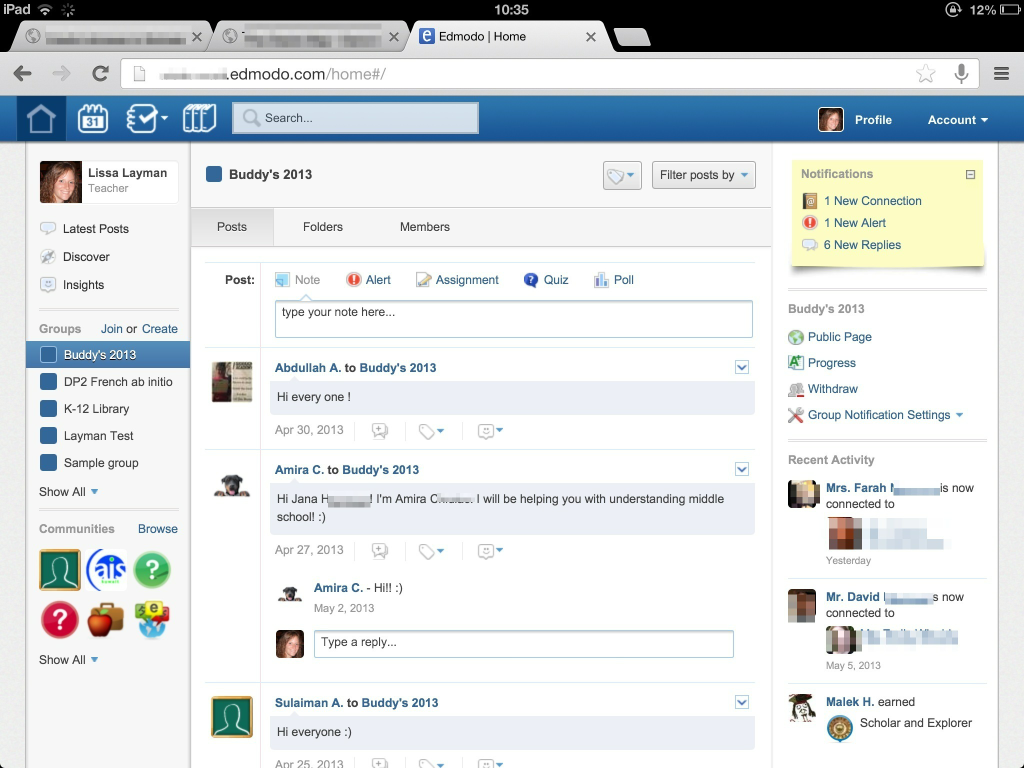
Our middle and high schools started using Edmodo this year. We have our own school domain and many teachers have been effectively using it to communicate with their students. Since the grade 5 students will need an Edmodo account for next year, we decided that it would be better to use a platform that they will need next year instead of having them sign up for something they will only use once. The counselor set up an Edmodo group and gave the group code to the grade 6 students (who immediately started posting, welcoming their buddies). Over the summer, she will monitor the group to make sure that students are being kind and respectful to each other.

Edmodo buddy group

Getting the grade 5 students signed up with a slightly bigger challenge. Edmodo does not allow you to batch sign-up students. We wanted students to have the responsibility and experience of signing themselves up. Not all students have a device at school. SO…I downloaded the free 30-day trial of Camtasia and did a little messing around. I had never made a screen-cast before but it only took me two tries to get what I wanted (although I went incognito the first time, I forgot to remove the bookmarks bar). Camtasia was super easy to use and I really liked exploring! I just wish it wasn’t quite so expensive. 😉

Note: I did not receive any compensation for this review. Just my honest opinion & experience.

Kuwait

New Hire Blog at our International School

International schools (especially ours) have lots of turnovers. I guess that’s what happens when there you sign 2 year contracts and you live in a desert. Last Spring we were invited to an AIS New Hire Blog. It was a great place to ask questions, get advice and bounce ideas off of each other (moving abroad is kind of a big deal). When I was asked to help with the set-up of the blog this year…I said heck yes!

Some details:

  • we use a free wordpress.com blog.
  • the blog is private and password protected, by invitation only.
  • the three tech coaches and assistant principals are the blog administrators.
  • the new hires are authors.
  • the AIS staff correspondents are followers.
  • new hires post questions (blog posts) and AIS correspondents post answers (comments).

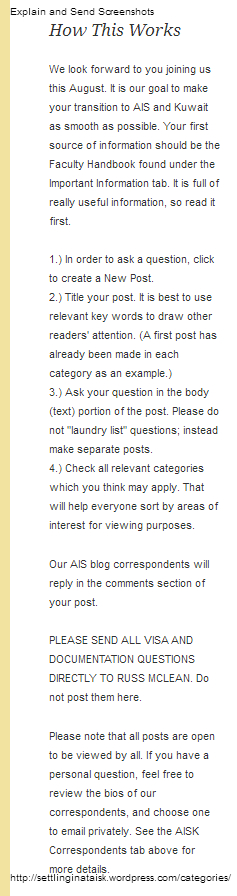
Here’s how it works (permanently on the left side-bar of the blog):

New Hire blog - how this works

Settling In

Our static pages:

  • A Welcome letter from the 4 Assistant Principals (in charge of orientation)
  • Bios (with pictures & email address) from the current AIS staff who have been selected to be correspondents (not the entire staff)
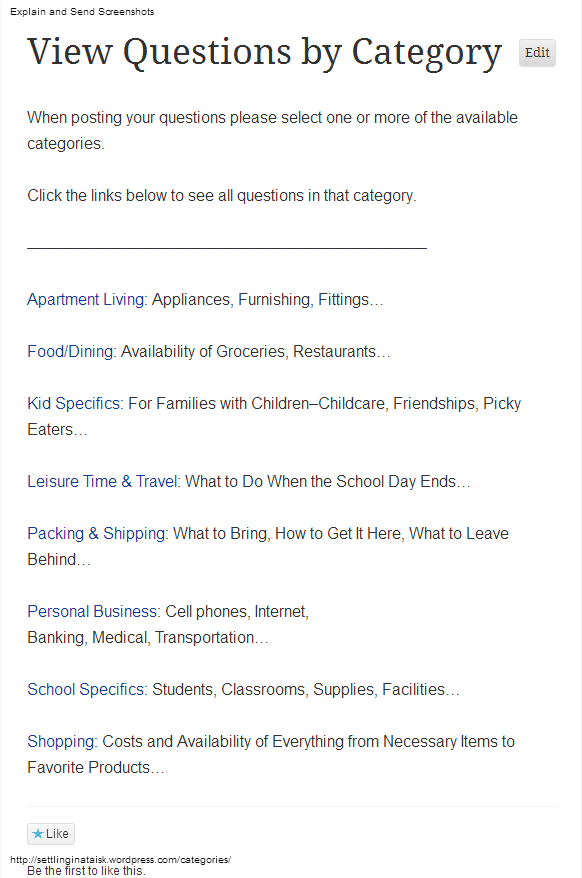
  • Questions by Category (with links & explanations)

New Hire blog - Categories

  • Important Information including the 2013-2014 calendar and a detailed tutorial (how to sign up for the blog, create posts, find questions, etc.)
  • Photo Albums (including apartments and staff travel experiences)

Currently we have almost the entire new cohort signed up and asking away! We’ve had a great response from the blog layout (thanks to Jeff and his budding photoshop skills for the header!). They’ve also really enjoyed the experience of getting their burning questions answered. I would highly recommend and new hire blog for any international school 🙂

Collaboration, Kuwait, Social Media

International Mindedness & Twitter

Thank you to everyone who helped me last week by answering my questions about Technology Coaches. My PLN is awesome!

Our school is starting voluntary focus groups based on where we feel we need to improve in our Middle Years Program practice. Because of my passion for culture, I chose to participate in the ‘International Mindedness‘ group.

Our initial meeting was just me and Deb, our MYP coordinator. We skimmed some literature from the IBO and then discussed what international mindedness might look like in our school. Our short-term goal is to help teachers incorporate/recognize the three dimensions of global consciousness (global sensitivity, global understanding and global self) in their unit plans.

As we were brainstorming, we discussed that maybe it was easier than one might think. In Earth science, instead of just teaching about sand and water (because that’s what we have in Kuwait) teachers should also be teaching about soil, ice, etc. The technology coach in me couldn’t help but connect international mindedness to global collaboration through the use of technology. Social media baby! Students are no longer confined to studying what they can see in their environment or what a book tells them.

Dinner is served

Kuwait is rife with pollution and we tend to focus on how bad it is here. During a unit of study, students could create a hashtag and share pictures of pollution in Kuwait on Twitter. With careful hashtag selection, these tweets could be seen by other students around the world. The goal would be to get students from all over to share pictures of pollution in their countries. I could see this idea getting changed around (for the better) by students. I’d love to see what could come of something like this across different content areas in our school when students took ownership of it. Students are on their phones constantly…let’s allow them to be open-minded communicators!

COETAIL, Collaboration, Kuwait, Professional Development, Social Media

#NESA_SEC 2013

To be honest, I attended the NESA Spring Educators Conference this year because my husband was chosen to present. Instead of wondering around Bangkok by myself for 3 days, I decided to pay (a lot) to attend the conference in the hopes of mediocre professional development. What I got was much more than that!

Networking: I had the opportunity to meet Dana Watts and Scott McLeod in person (and attend their sessions). I’ve been following them on Twitter for awhile and have a bit of a blog-crush on Scott’s Dangerously Irrelevant. I also found many new international educators to follow – my list is still primarily US-education based and I’m ready to expand my PLN! The discussions that took place on Twitter were equally as valuable as the sessions I attended.

Sessions: I really enjoyed the idea of the 4-hour workshops. Scott McLeod’s workshop blew my mind (as did the keynote). I was inspired & challenged by the content Scott delivered and by the collaboration that I participated in and witnessed. Check out the unit/lesson plan my group made (we had approx 25 minutes to create it). We then presented the lesson to another group who gave us feedback (and vice versa). I was completely overwhelmed at first (and didn’t like the constraints  but then it got me thinking -if we could do this in 25 minutes, what could teachers who actually teach this content do in an hour (or more!)? And I ended up really liking the fact that Scott had given us constraints – it focused us and was much closer to reality (we all have standards…). If I had gone to nothing else, these two sessions would have made the entire conference worth it.

Decisions: Scott & Jayson handed out fliers for the School Technology Leadership programs at the University of Kentucky during the workshop. My first instinct was to set it aside without really looking at it. The longer I sat in Scott’s workshop the more I felt that piece of paper calling to me. I listened to Scott and Jayson talk about the program and did a little of my own research. Wow. Even though I’ve already started my Masters with COETAIL, I felt pulled to the UKSTL Masters. Scott, Jayson and Dana were nice enough to answer a few questions for me…and my mind was made. I’ve been (quickly) assembling my application ever since (due May 1). I’m really excited about the possibility of being a part of the next UKSTL Masters cohort (I’ll still complete the COETAIL certificate, but won’t do the Masters). The more I sit on my decision to apply the stronger the pull becomes to be a part of ‘it.’

So…the Spring Educators Conference was a success. I am bummed that I missed out on the opportunity to meet Doug Johnson and attend his sessions. Next year the conference doesn’t back up to Spring Break…but if there’s a good line-up of presenters I might just pony-up the cash and go again. 🙂

Collaboration, Kuwait, Professional Development

K-12 SAMR PD – Phase 1.5

After introducing SAMR to our entire PreK-12 staff, we were granted a little extra time with the middle school teachers. Here’s how it went down:

1. Compile a list of how teachers answer the question “How are you using technology in your classroom as a direct tool substitute?” in a Google Doc to be shared with the entire middle school staff.

2. Allow teachers time to brainstorm tasks that they ask students to do.

3. Share out, creating a Popplet.

4. Brainstorm technology tools that teachers could use to accomplish their tasks (stress task first, tool selection second), adding to Popplet.

After the meetings, we finalized the Google Doc and all 4 Popplets. We also added more tools that we thought would best fit the tasks (quality over quantity). We sent the links to all the documents to the MS staff reminding them that the Popplet compilations are a work in progress and a toolbox for them to start using.

Do you have tools to add?
Grade 6
Grade 7
Grade 8 (there was a different thought process for this one)
Specialists

Lots of thanks and props to my wonderful co-worker (and husband) for helping brainstorm and give this PD! The popplet suggestion was genius! Thanks Jeff 😉

Kuwait, Professional Development

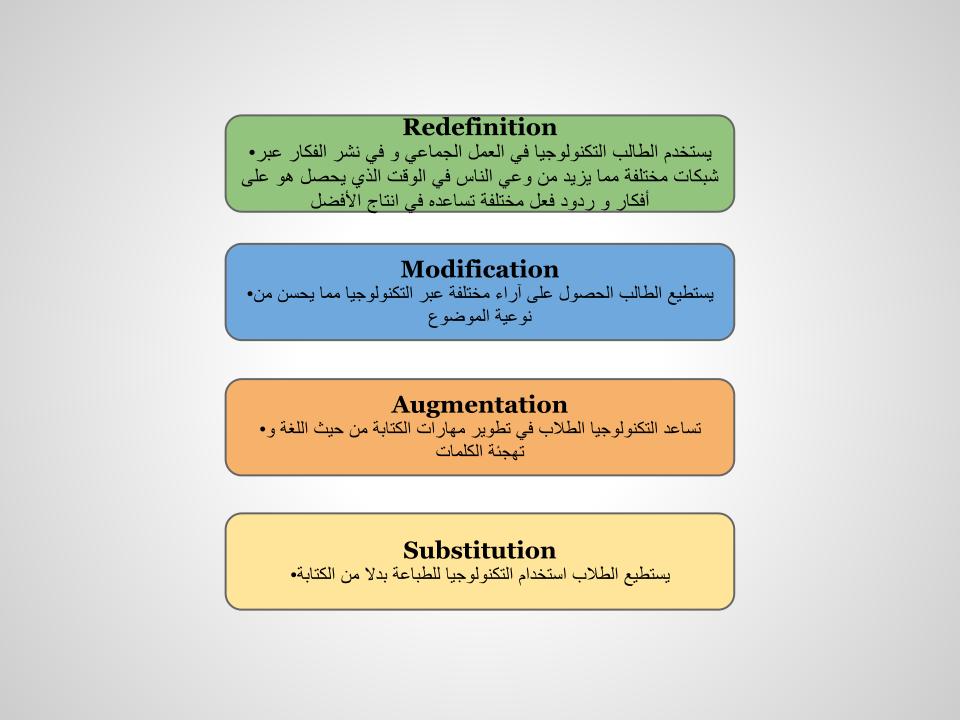
SAMR in Arabic

You may have noticed that one of the slides in my last post was a little funny looking. We have many teachers at our school in Kuwait who are native Arabic speakers and are at varying levels of English proficiency. We did quite a bit of searching and asking around but we weren’t able to find any resources to introduce SAMR to our Arabic staff. One of our wonderful HS Arabic as a Foreign Language teachers was amazing enough to sit down with me and work on a translation of SAMR. This translation keeps the English words for Substitution, Augmentation, Modification and Redefinition (to keep the acronym consistent). In addition, it is not a direct translation but gives an idea of the meaning behind S, A, M & R.

Feel free to use our translation as needed (with attribution of course). 🙂

SAMR - Arabic

Kuwait, Professional Development

K-12 SAMR PD – Phase 1

SAMR is something I’ve wanted to introduce to our staff for awhile…we were just waiting for the right time. We’ve had some setbacks with our 1:1 iPad initiative this year and I’m ready to step away from the device towards quality pedogogy and technology (not iPad) integration. After blogging about the proposed PD plan for COETAIL course 1, we’ve finally been able to put a few pieces into action here! It’s initiated some great discussions thus far and I’m looking forward to continuing with the SAMR mindset (we’re avoiding the terms framework and model) as we bring in new staff in August.

We went into the Elementary and High School divisional meetings and the Middle School grade level meetings. [Side note: One thing we’re quickly realizing is how different the vibe is between divisions. I’ve only ever taught in a high school so I’m used to the (sometimes) close-minded and bitter vibe (NOT saying that all HS teachers are this way!). Elementary teachers (while still a little bitter) are much more open to doing activities and having discussion.] Prior to the ES & MS meetings, the principals asked staff to read an article from the NASSP that we provided. Here is how each meeting was run:

1. Give teachers a couple minutes to talk about anything/everything they know about SAMR and do a little research on what it is (they had their iPads). We gave groups butcher paper in case they wanted to write anything.
2. Give them a little help (links to specific SAMR websites/articles).
3. Share out to the group about what they knew/found. Show them the SAMR visual.
4. Provide them unmarked examples of S, A, M & R (in paper & electronic formats). Allow them to discuss & debate in order to match the examples to ‘phases.’
5. Go over together which example matches S, A, M or R and ask teachers WHY.
6. Leave teachers with a question to ponder (to be followed up): “How have you used technology in your classroom as a direct tool substitute?”

We stressed that teachers are already doing these things and that we are just giving them common vocabulary to use. We are also avoiding the hierarchy mentality ..that’s not what SAMR is! After each meeting, we sent an email to all teachers with the resources used and a reminder of the question. See our slides (with examples linked) below. (They are very similar, only the examples are different.)

Elementary

Middle

High