Professional Development

I’m officially a Google Apps Certified Trainer!

Cross posted from my other blog.

EEEK!! I’m not going to lie – I’m super pumped about this! After more than a year of working on this application, it’s officially official 🙂

During the fall of 2012, I completed the coursework, paid for and passed the 6 qualification exams (you have 90 days to complete the tests). On December 4th I was awarded Google Apps Qualified Individual status.

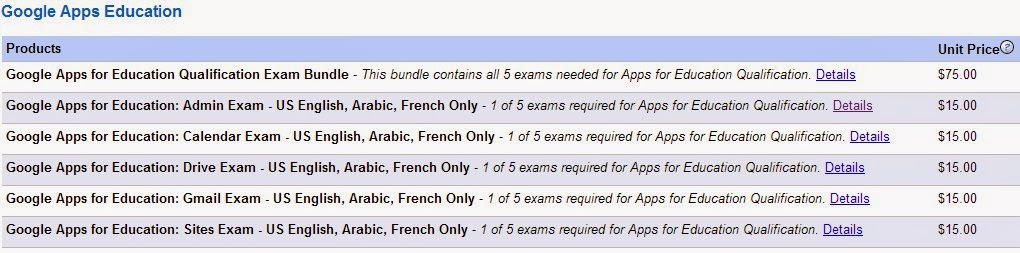
Since then, they have (supposedly) updated the tests to reflect the recent Google Apps updates. There are now only 5 tests that can be taken for $75 in English, Arabic or French.
After becoming a Qualified Individual, I had one year to complete the Certified Trainer application. I started working on the application in October/November. Since it is a Google Form (and therefore not savable), I kept all the answers to the questions in a Google Doc so that I could simply copy and paste when the time came. I made sure to share all my documents so that anyone with the link could view them.

The hardest parts for me were the two videos. Luckily I had used the COETAIL course 3 final project as a rough draft for my about me video. The most difficult thing was getting my videos cut down to the under 2-minute requirement…it goes by fast!

I recently discovered FormMule and have found it incredibly useful for disseminating information during my PD workshops.

There were a few hiccups in submitting my application. I started trying to submit by application on December 4th (the 1 year anniversary of my Qualified Individual status). However I kept getting an internal server 500 error. I was freaking out a little! Luckily I found the Google Apps for Education Certified Trainer forum. Becky notified me when the applications were back up (December 10) and assured me that I would not be penalized for submitting ‘late.’ Applications are currently not being accepted again for the first 8 weeks of 2014.

I can’t wait to explore the GACT community and see my name listed on the ‘Find a Trainer‘ site! Although I’m not super into badges, I have no problem displaying my new badge over there in my right sidebar 😉 And I’m proud to be officially considered ‘Googley’ (“Definition of “Googley” (according to Google) – Googley people are creative, passionate about their work, and ethical. They communicate openly; can thrive in a fast-paced, rapidly changing environment; and are willing to “roll up their sleeves” and get things done. They can be serious without wearing a suit and tie. Googley people can be worldwide experts and still encourage curiosity and questions without being condescending.”)!
Google, Professional Development

Work smarter, not harder

The bottom line for educators and technology (not tech integration) usually seems to be saving time. If it’s going to make my life more difficult – no thank you! But if I can utilize technology tools to make my life easier – tell me more! This is one of my favorite ways to get educators to buy in to Google Apps.

I recently discovered a script for spreadsheets that has changed how I collect and distribute information when I’m giving PD. It’s called formMule. Just as the name implies it does tons of work for you (saving you tons of time). While there are lots of ways to use it (most I haven’t yet discovered) I’ve been loving it to send out resources from my professional development sessions to the attendees. I’ve now used it 4 times and have had great success.

At the beginning (or end) of a PD session, I have teachers complete a short Google Form. Once they have submitted the form, they instantly receive an email from me.formMule auto email

I have to do a little work up front to set everything up, but it saves me enough time in the long run to make it completely worth it. The short video below is one I made for my Google Apps Certified Trainer application quickly showing how to set up the basic mail merge function.

Have you used formMule’s other functions? I’d love to hear about what else it can do!

Google, Kuwait, Professional Development

PEAK 2013 pt. 1 – Harnessing the Power of Google

On Saturday I presented at the Professional Educators Around Kuwait Conference for the second year. I presented three workshops this year and the first two were repeats from last year: Harnessing the Power of Google For Educators & For Collaboration. One hour is a whirlwind for both of these sessions and I can’t wait to turn them into 4-hour workshops at KIEC in January!

Saturday reminded me how passionate I am about GAFE. I love helping teachers discover new ways to use Google Apps for themselves and in their classroom. I just submitted my Google Apps Certified Trainer application…can’t wait to find out in 4-6 weeks if I got it! 🙂

I learned from the responses last year and booked a computer lab for both presentations. I also updated the presentations slightly…enjoy! And as always, please don’t hesitate to contact me with questions. 🙂

COETAIL, Google, UKSTL

Videos & Redesign

I’ve been incredibly busy with grad school and teaching French (yupp…that’s right. I’m teaching ‘temporarily’ teaching French again. I’m going into my 5th week starting tomorrow.) A few of my recent assignments were interesting so I thought I’d cross post them here.

For UKSTL EDL 661 with Jayson Richardson, we had to recommend 3 blogs for our classmates. I couldn’t pick only three so I recommended 4 in my first video using Jing. (If you have ideas for how to embed Jing videos in WordPress, let me know!)

For COETAIL course 3, there were 2 pieces to my final project. The first was to create a digital story. I decided to make a first draft of my video in order to become a GAFE Certified Trainer. Feel free to watch my video, read my post and leave me feedback so I can make it better!

Also for COETAIL, I had to revamp an existing presentation. Below is my final product. Check out the original and the handout I created on my COETAIL blog.

I’d love any and all constructive criticism to make these better! Thank you!

COETAIL, Course 3

This is the story of a girl

Last fall I did the training and took all the tests to become Google Apps Individually Qualified. I now need to complete the application to become a Google Apps Certified Trainer before December 4th. I made my video as a first draft of the one I will submit. Here are the specifications:

  • Submit a 2 minute video introduction about your background, role in education technology, and innovative approach to using Google Apps

I made my video using Jing and uploaded it to Screencast.
https://content.screencast.com/users/MmeLayman/folders/Jing/media/f4110cc2-2ba0-43b8-96ce-0cce977c478b/jingswfplayer.swf

My video is currently over 2 minutes. I’d love any input for how to make it better! Thank you!

Goodbye course 3…see you soon course 4!

Photo Credit: Earl – What I Saw 2.0 via Compfight cc

Google, Kuwait

Tracking Counseling Services with Google Forms

Last semester, our middle school counselor (Kit) asked for some advice on how she might best use technology to keep track of her time throughout the year. I suggested she create a custom Google Form. She did some brainstorming about what kind of data she would want and then we met to create her form.

Kit added 2 icons to her iPad – one linked to the form, a second linked to the results. Every time she provided a service she documented it by filling out the form.

Yesterday I met with her to walk her through analyzing the data.

First, we sorted the data on the Results tab by column. We copied and pasted the relevant data into a new sheet (one sheet for each category). We used the sum function to total the minutes she had spent on each service/category. Once each of the categories had been totaled, we created a new sheet with only the totals. We used this simplified data table to create a pie chart.

It was incredibly eye-opening for Kitr to see this data. She was not pleased that she had spent so much of her time in meetings (as opposed to working with students).

She did admit that although she had been diligent in documenting her time October through December, she did fall off the wagon in January (and completely stopped in March). She did feel as though the data she did collect was a good snapshot and could be extrapolated. She wanted advice for how she might be more consistent next year. We came up with a few ideas:

  • chunk her time by setting aside 5-10 minutes twice a day to fill out the form (instead of after every service).
  • put a copy of the pie chart on her wall so that she remembered how rewarding it was to see the data at the end of the year.

Kit does not see herself as tech-savvy…but I think the way she is using Google Forms is pretty awesome! It takes her time to learn, but she is eager to make her life easier and always appreciative. I love working with colleagues like that! She was also the brains behind the allowing grade 5 & 6 Buddies to communicate over the summer. I hope she keeps the challenges coming next year! 🙂

Collaboration, Kuwait, Professional Development

K-12 SAMR PD – Phase 1.5

After introducing SAMR to our entire PreK-12 staff, we were granted a little extra time with the middle school teachers. Here’s how it went down:

1. Compile a list of how teachers answer the question “How are you using technology in your classroom as a direct tool substitute?” in a Google Doc to be shared with the entire middle school staff.

2. Allow teachers time to brainstorm tasks that they ask students to do.

3. Share out, creating a Popplet.

4. Brainstorm technology tools that teachers could use to accomplish their tasks (stress task first, tool selection second), adding to Popplet.

After the meetings, we finalized the Google Doc and all 4 Popplets. We also added more tools that we thought would best fit the tasks (quality over quantity). We sent the links to all the documents to the MS staff reminding them that the Popplet compilations are a work in progress and a toolbox for them to start using.

Do you have tools to add?
Grade 6
Grade 7
Grade 8 (there was a different thought process for this one)
Specialists

Lots of thanks and props to my wonderful co-worker (and husband) for helping brainstorm and give this PD! The popplet suggestion was genius! Thanks Jeff 😉

Collaboration, Google, Kuwait, Professional Development

UAE #GAFESUMMIT 2013

Jeff and I headed to Dubai for the first time last week to attend and present at the Middle East GAFE Summit. It was everything we hoped it would be…and more (I know, so cliché but so true!).

Both of our presentations were on Thursday. In the days leading up to the Summit, I reached out to my PLN to help show the power of global collaboration. Everything went extremely well and I’m incredibly grateful to everyone who attended my session and collaborated on the document with us (feel free to keep adding to it)! I’ve embedded my presentation slide deck below. You can also check out my website for Conjugating Google Docs in the World Language Classroom.

The last session of the Summit was a demo slam. I’ve seen demo slams before but never participated. I found the courage inside (maybe the biggest group  of people I’ve ever presented to) and did a slam of Google Story Builder. I asked the crowd to help me create a story and we had fun story written and ready to share in under 3 minutes! If you use this in your classroom, I’d love to see how! The slam was a competition but I wasn’t in it to win it…just wanted to have the experience and do some sharing! The other presenters were a great group and we had fun slamming!

We met a lot of new people – it was extremely refreshing to be in Dubai and hang out with like-minded educators. We also attended several quality sessions. If you weren’t able to make the summit, all the session resources are online and Jeff Genest was kind enough to set up a Google Spreadsheet to collect all the #GAFESUMMIT tweets! The next summit is in Virginia next weekend so be sure to check out the resources and hashtag for more fun stuff.

Professional Development

UAE #GAFESUMMIT 2013

I’ll be back to regularly scheduled COETAIL posts this week (promise!), but I wanted to take a post to thank everyone that saw my pleas for collaboration last week and helped out! I love having a quality PLN 🙂

In case you’re interested, I just blogged about our weekend in Dubai at the GAFE Summit. I also included the resources from my presentation.

Merci bien et à bientot!

Professional Development

Come collaborate with us! #coetail #gafesummit #langchat

I’m in Dubai getting geared up to present at the Middle East GAFE Summit! I’ll be presenting Conjugating Google Apps in a World Language Classroom after the keynote this afternoon. I’d love to do some collaborating during the session with Google Docs. If you’re free between 5:30am & 6:30am EST and you have a minute, please read & comment on this article! Don’t forget to leave your info :)If you aren’t available live, no worries! Leave your info and some comments so we can see the power of global collaboration with GAFE! Merci!