Google, Kuwait

Tracking Counseling Services with Google Forms

Last semester, our middle school counselor (Kit) asked for some advice on how she might best use technology to keep track of her time throughout the year. I suggested she create a custom Google Form. She did some brainstorming about what kind of data she would want and then we met to create her form.

Kit added 2 icons to her iPad – one linked to the form, a second linked to the results. Every time she provided a service she documented it by filling out the form.

Yesterday I met with her to walk her through analyzing the data.

First, we sorted the data on the Results tab by column. We copied and pasted the relevant data into a new sheet (one sheet for each category). We used the sum function to total the minutes she had spent on each service/category. Once each of the categories had been totaled, we created a new sheet with only the totals. We used this simplified data table to create a pie chart.

It was incredibly eye-opening for Kitr to see this data. She was not pleased that she had spent so much of her time in meetings (as opposed to working with students).

She did admit that although she had been diligent in documenting her time October through December, she did fall off the wagon in January (and completely stopped in March). She did feel as though the data she did collect was a good snapshot and could be extrapolated. She wanted advice for how she might be more consistent next year. We came up with a few ideas:

  • chunk her time by setting aside 5-10 minutes twice a day to fill out the form (instead of after every service).
  • put a copy of the pie chart on her wall so that she remembered how rewarding it was to see the data at the end of the year.

Kit does not see herself as tech-savvy…but I think the way she is using Google Forms is pretty awesome! It takes her time to learn, but she is eager to make her life easier and always appreciative. I love working with colleagues like that! She was also the brains behind the allowing grade 5 & 6 Buddies to communicate over the summer. I hope she keeps the challenges coming next year! 🙂
1:1, Kuwait

Medieval Medley – a MYP Humanities Summative

In April, our two 8th grade MYP Humanities teachers approached us to collaborate on their upcoming summative. Students were able to pick a person, place or event, do research and then present their information to the class in a variety of ways. The teachers had already given students options for steps 1 to 3s. It took many meetings to come to a mutual understanding of what they wanted from us and how technology integration might look throughout the process. My biggest concern was that we keep the summative as inquiry based as possible (following what they had already created). I wasn’t a big fan of giving them a list of technology options with examples for each – I wanted students to be creative, not me. We ended up coming up with a variety of ways that students could use technology to create presentations from step 3. When I was contemplating the list, I made sure to start with the task (step 3) and then create a list of technology options.

Each tech coach took a couple class sections and attended three of their work sessions (after their research was complete). During the first session, we introduced a couple of the technology options.My goal was to focus on technology tools that they probably hadn’t seen or used before and talk about the task.

For the next 3 class periods, I circulated the room asking students how they had chosen to present (step 3) and giving advice/tech help where needed. Although there were still many students who simply used a PowerPoint or Keynote to give a lecture, there were a few who had some really great products. My favorite non-tech project was a medical time capsule. The student went all out and was completely committed to his project: he introduced it by saying he found this box while on vacation in Italy. It was quite creative!

Some of my favorite projects (using technology):

Overall, the project was further proof to me of how much work we “tech integrators” have to do to help people (students and teachers alike) understand the power of meaningful integration. I am not impressed by Keynotes with distracting transitions – what does this do to make a project BETTER, to increase learning? We need to get away from the flashy and encourage quality based in curriculum and pedogogy. It also struck me (again) that students have no concept for copyright. I used my COETAIL learning to talk to students about using images that they are allowed to use as I circulated the room. Next year I would suggest that a short lesson on copyright and creative commons is done before students start researching. Since the only criterion that was being assessed was D (Communicating) I would also suggest doing more with that – what makes good presentations, how can students best communicate their learning? Christina and I even thought the MYP Design Cycle might be able to be used 🙂

This was a good learning experience for me and I look forward to seeing what happens with the project next year!

COETAIL, Course 2

Course 2 Final Project: 20 Questions

Another one bites the dust! We’re 2/5 of the way done with COETAIL. I’ll finish up my 4th year teaching (1st year international) and head back to the States for the summer in 22 days. Then it’ll start all over again in just over 3 months (plus I’ll be adding on courses for my M.Ed. in School Tech Leadership)!

Christina, Janette and Karen did a revamp of our school’s AUP last year for their course 2 final project. An edited version has been adapted at AIS so I chose to create a UbD lesson plan. Kelsey and I connected on Twitter and then invited Jeff to join us. It was an interesting experience to be working with 1 person in a different country and another person with whom I share an office. Although Google Docs worked well, it was sometimes a challenge to avoid miscommunications and ensure that the three of us were on the same page. I imagine these challenges would be present if we were in the same place but collaborating solely through a GDoc with limited real-time chatting may have exacerbated them.

I think our lesson has definite promise. It would probably be ideal for grades 7-9 and would take several class periods to complete. I do not currently have a classroom but would love to hear from anyone that uses/adapts our lesson plan with their students!

Many thanks to Jeff and Kelsey for being great partners 🙂

Collaboration, Kuwait, Professional Development

K-12 SAMR PD Phase 2.0

It’s been awhile since we actually did phase 2.0 but I’ve been bad at blogging. I do want to make sure I get some thoughts down before I completely forget!

In Phase 1 we went into Divisional meetings. Phase 1.5 was done with only the Middle School teachers. For Phase 2.0 we attended Department (HS/MS) and Grade Level (ES) meetings. I attended the Language B, Science and Language A Arabic Department meetings. To date we have been invited into KG1 and Grade 3 meetings (only 5 to go…maybe).

Way back in Phase 1 of the SAMR series, we left teachers with the question “How have you used technology in your classroom as a direct tool SUBSTITUTE?” We wanted to make sure that we followed-up and didn’t leave teachers hanging so this was our first order of business. My priority was to give teachers a comfortable space to share what they have been doing. I think it is incredibly important that teachers are able to share with each other (without feeling judged) in order to foster discussion and ideas.

I then asked teachers to share a lesson (that they recently taught or will be teaching in the near future) that didn’t originally include technology but that they would like to brainstorm ways to transform. As a group we brainstormed ways that technology might be used, focusing on the great lesson plan and THEN the technology. I then briefly shared our Tech Coaches website with them. I included Jeff Utecht‘s SAMR Circle and my adapted Thinking Critically flow-chart. I didn’t go into detail about either but hope that we will be able to next year.

One of the challenges in the meetings was keeping everyone focused on the things we CAN control. Understandably teachers enjoy having a place to vent. Nonetheless it was great to get the conversation going and some great ideas were thought up. Below are excerpts from the emails I sent out after each meeting (my goal is to always follow-up!).

Kuwait

Grade 5 Transition & Experimenting

Even though we are a school of only ~2000 students, we still have three separate divisions. Our middle and high school are (literally) on top of each other but our elementary school is a separate building. Our middle school counselor has created a Buddy Program to help the grade 5 students transition from elementary to middle school. Each Grade 5 student is paired with a grade 6 “Buddy.” I think this is a great idea so when she approached me to help her brainstorm ways for the students to be in touch over the summer, I was all-in!

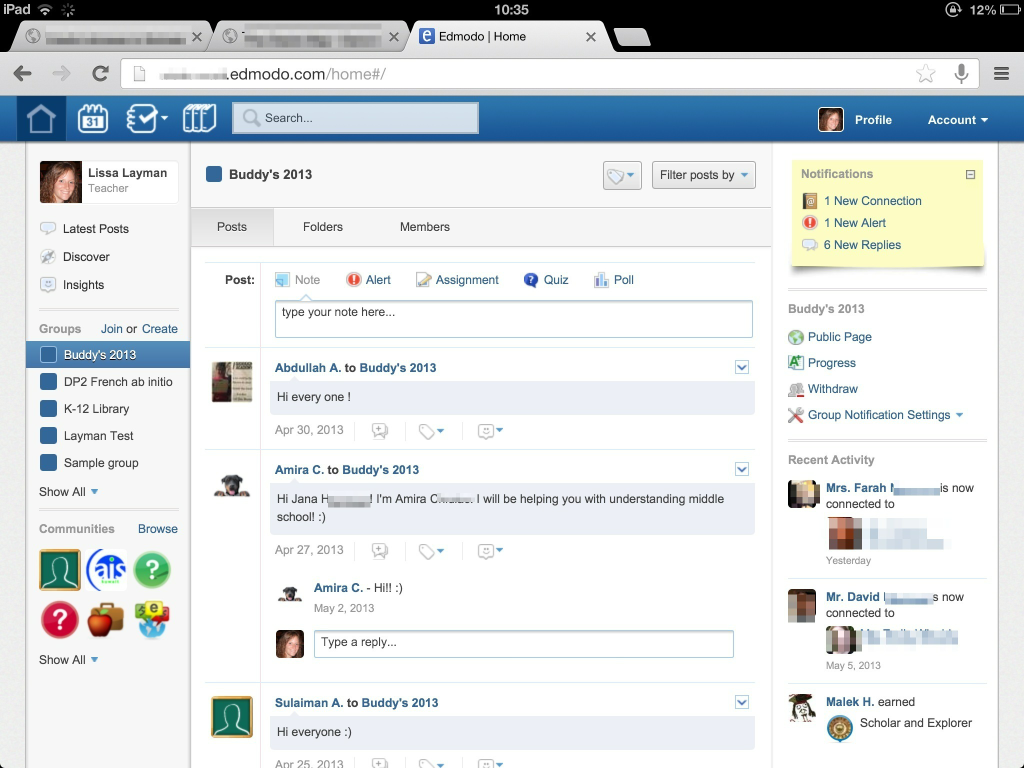
Our middle and high schools started using Edmodo this year. We have our own school domain and many teachers have been effectively using it to communicate with their students. Since the grade 5 students will need an Edmodo account for next year, we decided that it would be better to use a platform that they will need next year instead of having them sign up for something they will only use once. The counselor set up an Edmodo group and gave the group code to the grade 6 students (who immediately started posting, welcoming their buddies). Over the summer, she will monitor the group to make sure that students are being kind and respectful to each other.

Edmodo buddy group

Getting the grade 5 students signed up with a slightly bigger challenge. Edmodo does not allow you to batch sign-up students. We wanted students to have the responsibility and experience of signing themselves up. Not all students have a device at school. SO…I downloaded the free 30-day trial of Camtasia and did a little messing around. I had never made a screen-cast before but it only took me two tries to get what I wanted (although I went incognito the first time, I forgot to remove the bookmarks bar). Camtasia was super easy to use and I really liked exploring! I just wish it wasn’t quite so expensive. 😉

Note: I did not receive any compensation for this review. Just my honest opinion & experience.

COETAIL, Course 2

Social Media Usage: An Analysis

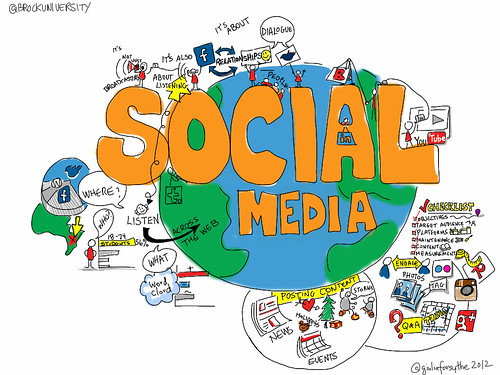
@brockuniversity Social Media

Many connected educators talk and blog about the stages of Twitter and PLN adoption (even I mentioned it). But have you ever taken a second to analyze how and why you use social media both personally and professionally?

Twitter
If I look at my Twitter account (professional), I tweet out a lot of articles. I’ve tried really hard to start including a short thought so that the tweet isn’t so sterile. I then add the title of the article, the link, a relevant #hashtag (or two) and the SOURCE. If the person is on Twitter, I find & use their handle. If the person isn’t on Twitter (rare), I include their name. Here is a sampling of what I’ve shared lately:

Twitter pt. 2
I also use Twitter when I’m at conferences to share what I’m learning from the workshops and keynotes I attend. In this case, I include the quote, the SOURCE and a #hashtag (or two). Here are a few from #NESA_SEC in April:

If the person doesn’t have Twitter, I still use their name:

Facebook
My Facebook use is 99% personal. However even there I tend to focus on sharing. Of my last 10 posts: 4 were stories/statements (I tagged someone else in every one), 2 were photos (I tagged friends in both), 3 were links/videos relevant to my friends, and 1 was a request for input for my little brother’s college project on Dubai.

Key Word(s)?
If I look at my overall usage of social media (I could also include Instagram, Linked In, Google+my professional blog, Pinterest and our travel blog), I tend to focus on sharing and connecting. I don’t share things just to share – I share them to connect to other people. Hyperlinks and social media have made this possible. This is not how I began using Facebook (2004) and Twitter (2010) however. My progression to zen with social media has been years in the making. And I still struggle with whether I should keep my accounts private (Facebook, Instagram) or public (the rest).

What does your social media usage look like? How do you decide when you should (or shouldn’t) post something and where you’re going to post it (I wish I could remember where I found that link!)? The demographics of social media use are incredibly intersting. What type of social media user are you??

[Thank you to Chelsea for helping me re-find those last two links! Social media IS all about connections ;)]

Kuwait

New Hire Blog at our International School

International schools (especially ours) have lots of turnovers. I guess that’s what happens when there you sign 2 year contracts and you live in a desert. Last Spring we were invited to an AIS New Hire Blog. It was a great place to ask questions, get advice and bounce ideas off of each other (moving abroad is kind of a big deal). When I was asked to help with the set-up of the blog this year…I said heck yes!

Some details:

  • we use a free wordpress.com blog.
  • the blog is private and password protected, by invitation only.
  • the three tech coaches and assistant principals are the blog administrators.
  • the new hires are authors.
  • the AIS staff correspondents are followers.
  • new hires post questions (blog posts) and AIS correspondents post answers (comments).

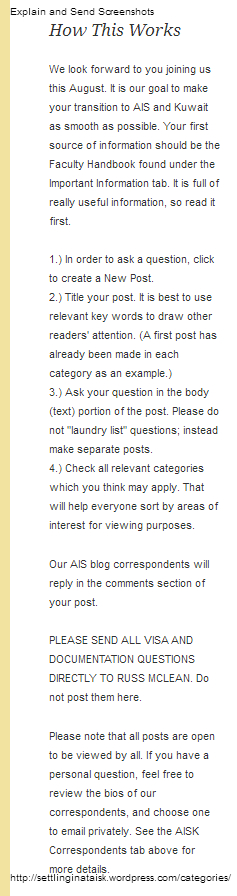
Here’s how it works (permanently on the left side-bar of the blog):

New Hire blog - how this works

Settling In

Our static pages:

  • A Welcome letter from the 4 Assistant Principals (in charge of orientation)
  • Bios (with pictures & email address) from the current AIS staff who have been selected to be correspondents (not the entire staff)
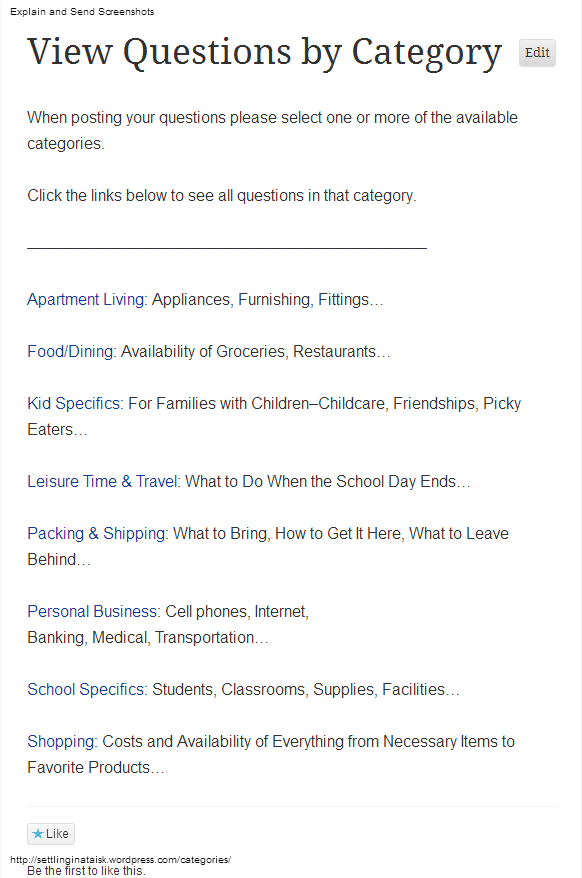
  • Questions by Category (with links & explanations)

New Hire blog - Categories

  • Important Information including the 2013-2014 calendar and a detailed tutorial (how to sign up for the blog, create posts, find questions, etc.)
  • Photo Albums (including apartments and staff travel experiences)

Currently we have almost the entire new cohort signed up and asking away! We’ve had a great response from the blog layout (thanks to Jeff and his budding photoshop skills for the header!). They’ve also really enjoyed the experience of getting their burning questions answered. I would highly recommend and new hire blog for any international school 🙂

Collaboration, Kuwait, Social Media

International Mindedness & Twitter

Thank you to everyone who helped me last week by answering my questions about Technology Coaches. My PLN is awesome!

Our school is starting voluntary focus groups based on where we feel we need to improve in our Middle Years Program practice. Because of my passion for culture, I chose to participate in the ‘International Mindedness‘ group.

Our initial meeting was just me and Deb, our MYP coordinator. We skimmed some literature from the IBO and then discussed what international mindedness might look like in our school. Our short-term goal is to help teachers incorporate/recognize the three dimensions of global consciousness (global sensitivity, global understanding and global self) in their unit plans.

As we were brainstorming, we discussed that maybe it was easier than one might think. In Earth science, instead of just teaching about sand and water (because that’s what we have in Kuwait) teachers should also be teaching about soil, ice, etc. The technology coach in me couldn’t help but connect international mindedness to global collaboration through the use of technology. Social media baby! Students are no longer confined to studying what they can see in their environment or what a book tells them.

Dinner is served

Kuwait is rife with pollution and we tend to focus on how bad it is here. During a unit of study, students could create a hashtag and share pictures of pollution in Kuwait on Twitter. With careful hashtag selection, these tweets could be seen by other students around the world. The goal would be to get students from all over to share pictures of pollution in their countries. I could see this idea getting changed around (for the better) by students. I’d love to see what could come of something like this across different content areas in our school when students took ownership of it. Students are on their phones constantly…let’s allow them to be open-minded communicators!

COETAIL, Course 2

Thoughts on Digital Safety – Nothing Revolutionary

Thank you to everyone who helped me last week by answering my questions about Technology Coaches. My PLN is awesome!

Student safety and cyber-bullying has been the focus of a lot of press lately. As educators, we need to be aware that just because students know how to use devices (tablet, computer, etc), they don’t know how to behave when they’re using them. Behaving appropriately online is not an innate ability that students are born with. Instead it is something that must be taught. Who and how is the golden question!

This responsibility of teaching kids digital etiquette needs to be shared by both school and home. Parents can start from a young age at home. Common Sense Media has lots of great resources and parent agreements to support parents. Although I’m not a parent, I think it is parents’ job to help students understand how to appropriately use technology instead of banning it. If your kids are inappropriately using the technology that you gave them, help them learn what they should do differently instead of simply taking it away. Am I a crazy no-kid lady?

Unfortunately, not all adults understand how to behave online. This is where schools should come in to support and educate parents. Once students start school, teachers should be incorporating digital citizenship into their lessons on a daily basis. In 2013 most people own multiple devices, these type of lessons do not need to be an “extra.”

Parents and teachers also need to be living what they preach – if you don’t want your child to text during dinner, parents shouldn’t either; if you don’t want your students to text during class, teachers shouldn’t either. We need to be constantly modeling digital etiquette for our students.

Parents and schools should be working together to help students harness technology for good. Bullying and students being disrespectful to each other is nothing new. Unfortunately, however, technology can exacerbate the situation. Many students around the world are doing amazing things with technology (even if the media focuses on the negative). Scott McLeod‘s keynote, Powerful Technologies Powerful Youth, at the NESA Spring Educators Conference in Bangkok last month highlighted some of these students.

It is important that both children and adults are aware of the power of technology (good and bad). Explicitly and implicitly teaching students how to behave online is the job of the community, not the individual.

Community Garden Work Day

This post doesn’t seem revolutionary or original to me. But I’m glad I had the opportunity to find some good resources and get my thoughts down on “paper.” 😉