Kuwait, Professional Development

Visual interpretation in the language B classroom

Yesterday I attended the MS/HS language B department meeting. We have both MYP & DP Language B offered in Arabic and French. One of their criterion is Visual Interpretation. The teachers wanted to learn about a few ways they could create posters (etc) for summative tasks for their students. After doing a little research, I decided to highlight 4 tools: PS Touch, Glogster, ThingLink and Tumblr. Below is the follow-up email I sent out this morning. I would love to hear about how you and your students create visual interpretation tasks & summatives in your MYP or DP language B classes! 

My reflection: First – why not use authentic realia for visual interpretation tasks? The power of language B is that it is alive and real in the world. Second – as a language B teacher and technology integration lover, my mind goes to what can my students create. The tools I presented can simply be used by staff to create tasks for the students but the real power comes when the tasks can be transformative.

  • Students create their own media (or find Creative Commons licensed media).
  • Pictures are edited using Photoshop (Instagram?) and videos could be uploaded to YouTube.
  • This media is then be used to create Glogs and/or ThingLinks.
  • The next step (towards redefinition) would be to compile the media into a Tumblr blog where students could document the journey of their visual, reflect on their visual and others’ and get input from the teacher, classmates and people around the world.

Good morning!

Thanks for letting me stop by your department meeting yesterday. I hope the tech tools you saw gave you a few ideas for visual interpretation in your classrooms. When I chose them I thought that they could be used by teachers or students to create visuals. These tools range from augmentation (PS Touch) to the possibility for redefinition (Tumbr). If you’ve found other tools, please don’t hesitate to share! Let me know if you have any questions. 🙂

Creative Commons Search – a great place to start to find media (photos, videos, audio, etc) that you are allowed to use (not copyrighted).

PS Touch (school iPad app)

  • No account needed.
  • Can create visuals with text from basic to advanced.
  • Tutorials built into app.
  • Students can email photo and/or print (or export to use in one of the options below).

Glogster (create & view on computer, view only on iPad)

  • You must create an account.
  • There is a free version that includes a 31-day premium trial.
  • Students should use Glogster.com to create accounts.
  • Great for students or teachers to create.
  • Choose your editable template. Add text, graphics, images, audio and video. Save & share the link. Can be printed.
  • CAN view on iPad (with free app) but cannot create.

ThingLink (also a free app)

  • You must create an account.
  • Great for students or teachers to create.
  • Can create and view on both computer & iPad.
  • Add an image. Then add ‘tags’ to insert text, photos, web links, music or videos. Share & save the link. Not ideal for printing.
  • Cool example

Tumblr (also a free app)

  • You must create an account.
  • You can have multiple ‘blogs’ per account.
  • Best for students to create on-going visuals throughout a unit.
  • Add text, photos, quotes, web links, chats, audio & video.
  • Students can share the link to their Tumblr blog with teachers. Not ideal for printing.
  • Has potential for redefinition (SAMR).
Collaboration, Kuwait, Professional Development, Social Media

PEAK 2013 pt. 2 – Making the Web Work for You

After my first two sessions at PEAK last weekend, I gave a brand new workshop. As excited as I was about my Google Apps presentations, I might have been even more excited for “Making the Web Work for You.” I focused on becoming a connected educator and specifically on Twitter (I purposely left both of those terms out of the title because I didn’t want to scare anyone away). I’m realizing that besides meaningful technology integration, GAFE and being a connected educator are my passions. I love working with anyone, anywhere on these and don’t need anything in return.

I started by appealing to their feelings (educators never have enough time) and highlighting what they thought Twitter was. I then talked about what it actually is and gave them testimonials from the survey I created and other connected educators. I was heavily influenced by Steve Anderson‘s Twitter series but did have significant time constraints. I highlighted searching, hashtags and a few other must-knows. Then I gave them time to create accounts, explore some hashtags, find people to follow. A genius idea from Jeff – make sure everyone in the class follows everyone else before the session is over. I ended with ideas for organizing all this new info and next steps.

It was a great plan. And then I realized 20 minutes before the start of the session that Twitter was blocked at the school (!!!). Oh my goodness. I tried several different things but unfortunately I had forgotten my wireless router at home and we were in the basement (so my phone wasn’t working as a hot spot). But..it was okay. I let someone borrow my iPad and we just went with the flow. The workshop didn’t go exactly how I planned it but I still got great responses and people were excited about the possibilities of becoming connected. It was another example of how becoming a teacher has changed me – I’m flexible and don’t get easily rattled! 🙂

Google, Kuwait, Professional Development

PEAK 2013 pt. 1 – Harnessing the Power of Google

On Saturday I presented at the Professional Educators Around Kuwait Conference for the second year. I presented three workshops this year and the first two were repeats from last year: Harnessing the Power of Google For Educators & For Collaboration. One hour is a whirlwind for both of these sessions and I can’t wait to turn them into 4-hour workshops at KIEC in January!

Saturday reminded me how passionate I am about GAFE. I love helping teachers discover new ways to use Google Apps for themselves and in their classroom. I just submitted my Google Apps Certified Trainer application…can’t wait to find out in 4-6 weeks if I got it! 🙂

I learned from the responses last year and booked a computer lab for both presentations. I also updated the presentations slightly…enjoy! And as always, please don’t hesitate to contact me with questions. 🙂

Collaboration, Kuwait, Professional Development

Input needed: tips to cultivating a thriving PLN

Jeff and I have a few upcoming presentations we’d love some input on! Please fill out the embedded Google form below…then check it out as the answers populate. Please feel free to use any of the information gathered for yourself!

At PEAK in a couple weeks (…10 days) I’ll be presenting an hour-long workshop on how social media can make educators lives easier.
Session title: Making the Web Work for You
Session description: Come learn how social media and other websites can save you time and energy while also enhancing your lessons. By the end of this session you will be on your way to creating a thriving Personal Learning Network with other educators around the world. It may be helpful to bring your own laptop or tablet.

In January, Jeff will be presenting a 4-hour workshop on getting involved on Twitter and blogging.
Session title: Becoming a Connected Educator
Session description: Thousands of educators all around the world share their thoughts, ideas and lesson plans with each other every day, and you’re only 140 characters away from joining them. In the first half, you’ll learn how to leverage Twitter and other forms of social media as a means of finding new ideas. In the second half, we’ll get you set up with your own blog so you can start sharing with the world.

Check out my Diigo library for some of the resources we’ve previously found.

Kuwait

Connect to ES #music classes!

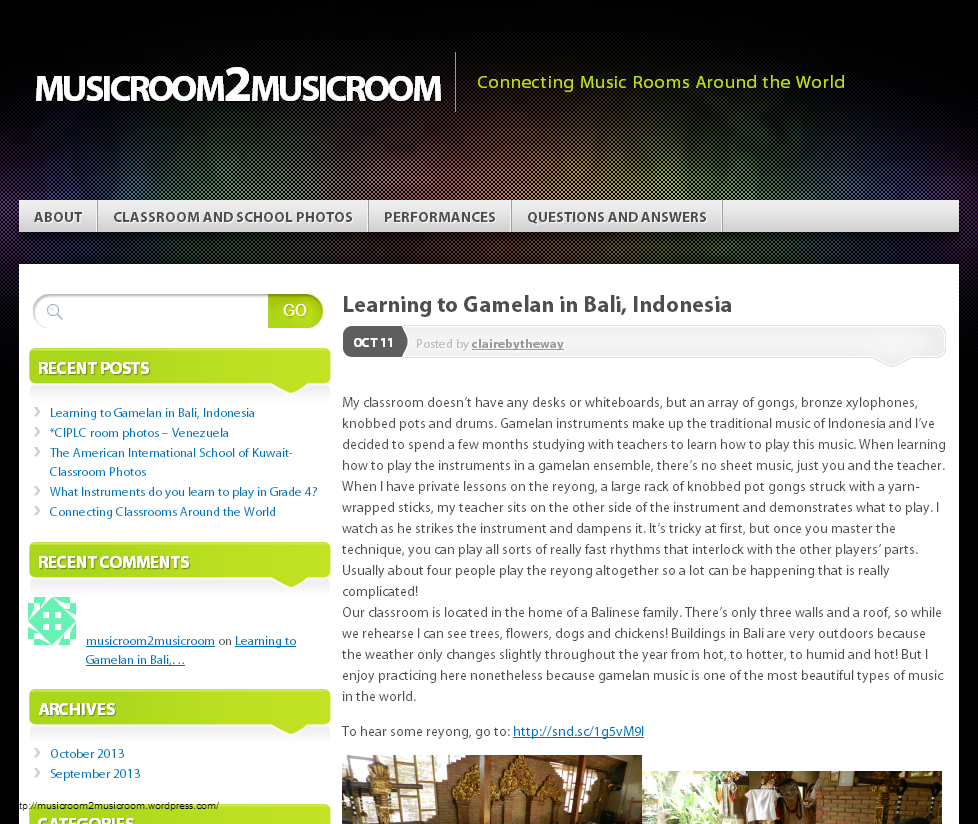
Our elementary music teachers have started a blog in order to connect classrooms around the world. I LOVE it! If I haven’t mentioned it before, my favorite use of technology is the connections it allows. I had no hand in the idea for this blog and I’m so proud of our teachers for their initiative and drive. As an IB World school, this is a great opportunity for students to become open-minded, inquirers and communicators.

From their About page:

This blog is an attempt to connect music classrooms all around the world, with the overarching goal of helping students realize that they have something in common with students all over the world. This is a place for questions to be asked and answered, performances shared, and music to be celebrated!

They have had 3 posts from other schools so far and are hoping for many more! If you’re interested in participating (or want more information), email Nick & Stacey. The blog is currently private to protect students’ identities.

musicroom2musicroom

Collaboration, Kuwait

Connect to ES #music classes!

Our elementary music teachers have started a blog in order to connect classrooms around the world. I LOVE it! If I haven’t mentioned it before, my favorite use of technology is the connections it allows. I had no hand in the idea for this blog and I’m so proud of our teachers for their initiative and drive. As an IB World school, this is a great opportunity for students to become open-minded, inquirers and communicators.

From their About page:

This blog is an attempt to connect music classrooms all around the world, with the overarching goal of helping students realize that they have something in common with students all over the world. This is a place for questions to be asked and answered, performances shared, and music to be celebrated!

They have had 2 posts from other schools so far and are hoping for many more! If you’re interested in participating (or want more information), email Nick & Stacey. The blog is currently private.

musicroom2musicroom

Kuwait

Does your school use ID cards?

Happy Sunday!

Our school will be obtaining ID cards for all staff and students in the coming weeks. The stated purpose is for security, printing and discounts (in the community). For security reasons, the thought is to have all teachers wearing visible IDs so staff members are easily differentiated from other adults. For students, the primary purpose will be printing for now but we have discussed students wearing them. As this is the first time we will have IDs at our school, we have some questions! We are particularly interested in how visible IDs would work in the lower elementary and certain classes (PE, art, etc). Please comment or email me…we’d love to have input from a variety of schools around the world!

1. Do all teachers wear IDs? If yes, how do they display them? How have staff reacted to this policy?

2. Do all students wear IDs? If yes, how do they display them? How have students reacted to this policy?

Thank you!

COETAIL, Kuwait, Professional Development, UKSTL

Kuwait: Year 2!

I cannot believe it’s already September! We had a great summer: spent quality time with lots of friends & family, traveled for a month in the US, and mostly disconnected. Now we’re back in Kuwait for year 2 (year 5 teaching) and school is already under way!

It was incredibly refreshing to disconnect from my PLN this summer. I didn’t blog, keep up with Twitter or read my RSS feeds. During the last 2.5 weeks back “home,” I’ve been trying to get used to the heat while getting ready to dive in full force this semester. Today starts COETAIL Course 3 and EDL 661 with UKSTL. I’ll be taking 12 graduate credits this semester and have already started to feel a bit overwhelmed. However, I’m incredibly ready to be challenged, fulfilled and rewarded. Looking at the outlines for all 4 courses has made me eager and excited. I can’t wait to start learning and growing professionally!

I plan to continue to reflect professionally and share resources on this blog. However with a total of 21 graduate credits while working full-time this year, I may not be posting regularly (not that I did before either!). I would, however, like to continue to grow my PLN and collaborate with educators around the world.

I’ve tried incredibly hard to come back to school this year with a positive, go-with-the-flow attitude. I’ve decided to make myself stand out in my position (as technology coach) by intentionally showing teachers that I care about how they’re doing and supporting them. The first week with new & returning staff was an amazing week of professional discussion and collaboration organized by the middle & high school principals. It set a great tone for the start of the school year. The entire 6-12 staff participated in several protocols (including Compass Points – I’m a north with tendencies towards east & west). I particularly liked the text-based protocols and the articles chosen. Our HS principal also shared a video with me that is worth slowint down and watching for 20 minutes: Celebrate What’s Right with the World. If only more human beings had this attitude…what a world it could be!

Happy September, happy school year and happy new beginnings!

1:1, Collaboration, iOS, Kuwait

Language B Final Exam Review

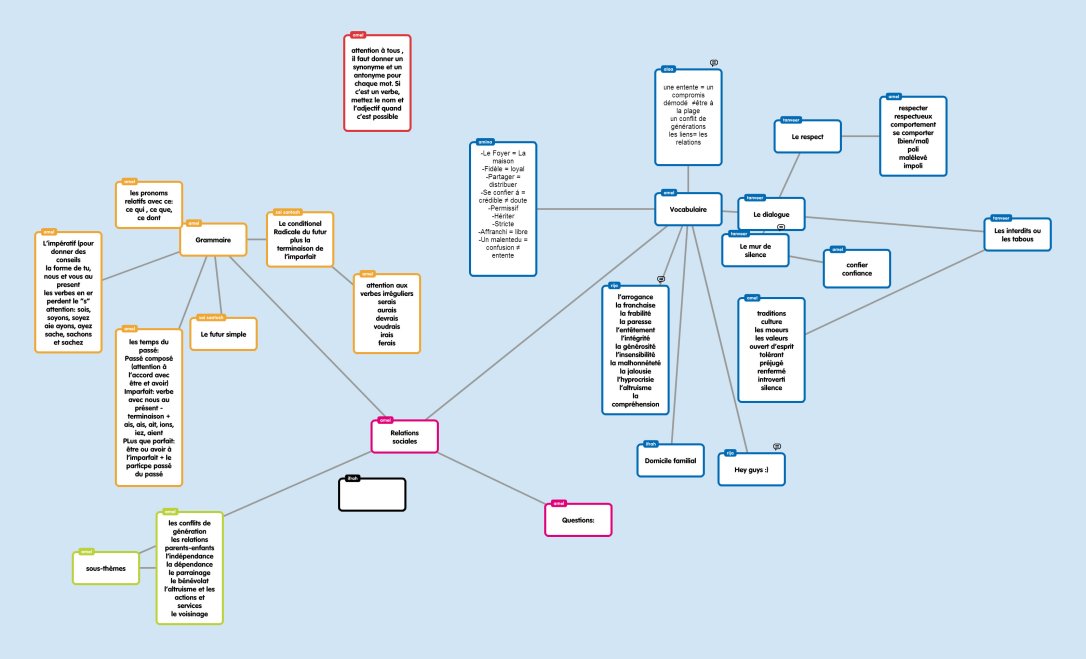
When I brainstormed with the Language B department (Arabic & French) about how they could meaningfully integrate technology (SAMR prof development), they were eager to talk about the (quickly approaching) end of the year. Reviewing with students can be frustrating for both students and teachers. They wanted a way to put the responsibility of the review on their students while also engaging them. Although we came up with several ideas, they were most intrigued by Popplet (some of them had already seen it) and two of our French teachers (MYP & DP) gave it a try.

The teachers signed up for free Popplet accounts. For homework, the students signed up for accounts. Amel, the DP French teacher, created a popplet for each unit. She then created popples for grammar, vocabulary, and sub-topics. Once the structure was set, she invited students to the popplet. It was the students’ responsibility to fill in the popplet with grammer concepts, vocabulary words and sub-topics.
Tronc commun  Relations sociales

The middle school MYP teacher also used Popplet in a similar way with her students.
FRENCH REVIEW GRADE7

It was fun to hear the oohs and aahs from the students when I added a popple from the desktop and it showed up on their screens. The teachers liked that their students could collaborate and that each popple automatically included the creator’s name. Although only the creator can edit a popple, the teachers liked the comment function to help guide students. The ease of adding students to popplets was beneficial for the teachers. The ability to share links to popplets (on their class Edmodo pages) and create images was incredibly useful. The biggest negative? We’re an iPad school – the fully functional free website is flash-based and the app (with ability to collaborate) costs money. Also, you can only create a limited number of popplets (easily solved by saving the image when done and deleting the popplet).

Although this isn’t a “redefined” use of technology, the ability to simultaneously collaborate on a brainstorm with students gives it more oomph than “substitution.” It was a little taster for our teachers and hopefully they’ll be able to build on their experiences next year.

Google, Kuwait

Tracking Counseling Services with Google Forms

Last semester, our middle school counselor (Kit) asked for some advice on how she might best use technology to keep track of her time throughout the year. I suggested she create a custom Google Form. She did some brainstorming about what kind of data she would want and then we met to create her form.

Kit added 2 icons to her iPad – one linked to the form, a second linked to the results. Every time she provided a service she documented it by filling out the form.

Yesterday I met with her to walk her through analyzing the data.

First, we sorted the data on the Results tab by column. We copied and pasted the relevant data into a new sheet (one sheet for each category). We used the sum function to total the minutes she had spent on each service/category. Once each of the categories had been totaled, we created a new sheet with only the totals. We used this simplified data table to create a pie chart.

It was incredibly eye-opening for Kitr to see this data. She was not pleased that she had spent so much of her time in meetings (as opposed to working with students).

She did admit that although she had been diligent in documenting her time October through December, she did fall off the wagon in January (and completely stopped in March). She did feel as though the data she did collect was a good snapshot and could be extrapolated. She wanted advice for how she might be more consistent next year. We came up with a few ideas:

  • chunk her time by setting aside 5-10 minutes twice a day to fill out the form (instead of after every service).
  • put a copy of the pie chart on her wall so that she remembered how rewarding it was to see the data at the end of the year.

Kit does not see herself as tech-savvy…but I think the way she is using Google Forms is pretty awesome! It takes her time to learn, but she is eager to make her life easier and always appreciative. I love working with colleagues like that! She was also the brains behind the allowing grade 5 & 6 Buddies to communicate over the summer. I hope she keeps the challenges coming next year! 🙂